
Last month I finally did something I had been avoiding for almost a year—I counted the cables on my home office desk.
The number was eleven.
MacBook Pro power cable. External monitor cable. Webcam cable. USB hub cable. Desk lamp cable. iPhone charging cable (loose on the desk, rarely where I needed it). iPad cable (same problem). External hard drive cable. Keyboard charging cable. Mouse charging cable. And one mystery cable that I genuinely could not identify and was afraid to unplug in case it was doing something important.
Eleven cables running to three different power strips, spreading across a desk that’s supposed to be a productive workspace, and having quietly become a cable management catastrophe.
My partner looked at my desk during a video call and said audibly, “How do you work like that?”
That was the week I started researching charging stations seriously. Not cable organizers—those just tidy up the mess they don’t eliminate. A single device that could replace multiple power strips, charge faster, and reduce the cable count to something defensible.
The MOKiN 100W Max Charging Station with Retractable Cord, 8-in-1 Power Strip was the solution I landed on. Three months later, here’s the complete honest story.
What the MOKiN 8-in-1 Actually Offers
Let me be specific before describing the experience, because “8-in-1” gets applied to everything from genuinely useful hubs to marketing-inflated products where five of the eight are barely functional.
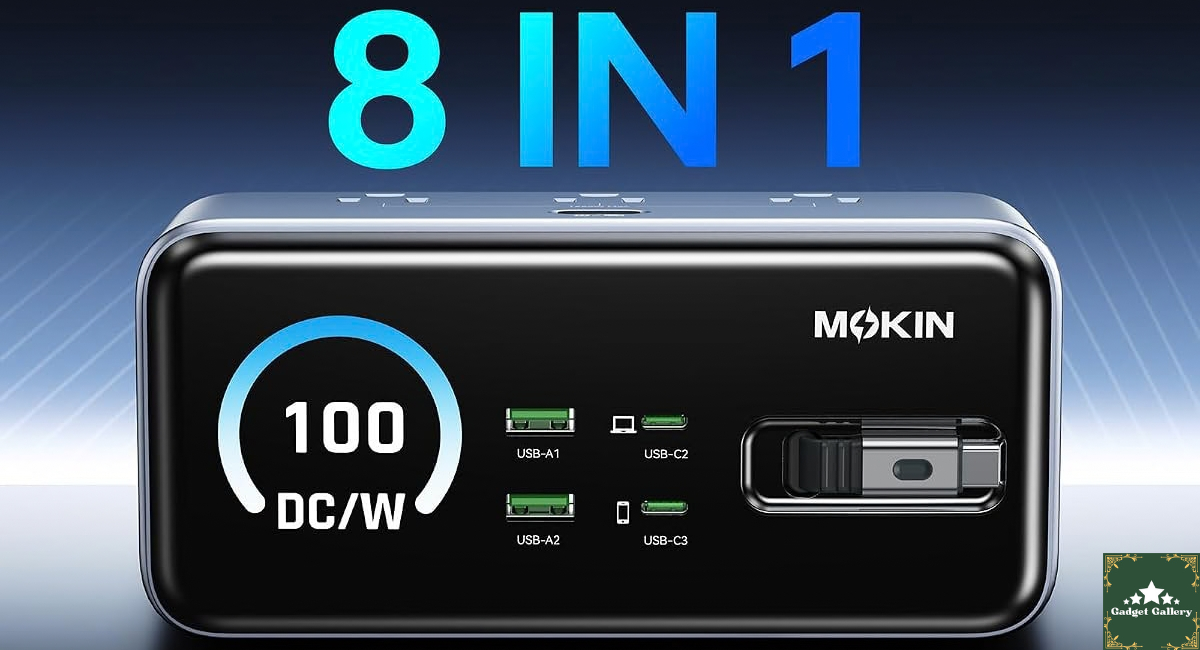
The MOKiN unit combines:
3 AC outlets—standard three-prong outlets for devices that need full wall power (monitors, desk lamps, desktop computers)
2 USB-C ports—one at up to 100W for laptop-level fast charging, one at lower wattage for phones and tablets
2 USB-A ports—standard USB-A for older cables and devices
1 Retractable USB-C cable—built into the unit, extends when needed, retracts flush when not in use
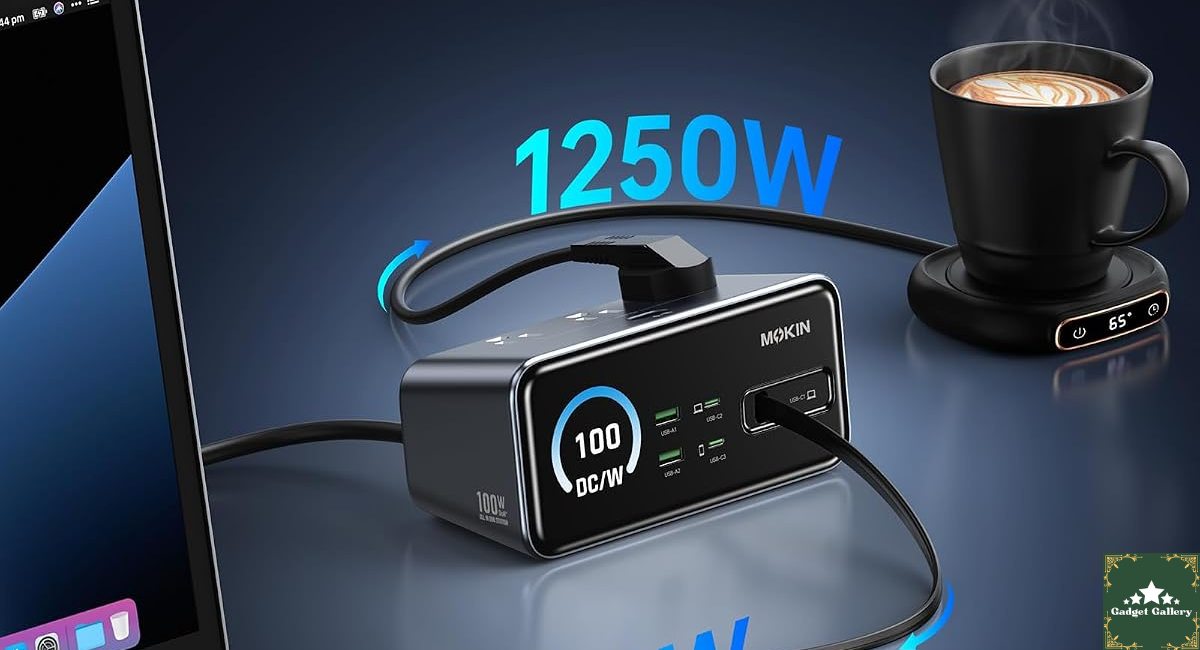
The retractable cord refers to the power input cord—the cable that connects the unit to your wall outlet that retracts into the power strip body when you want compact storage or travel portability. This is the feature that separates MOKiN from standard power strips and is the one I was most curious about in real daily use.
100W maximum refers to the combined USB output capability, with the single 100W USB-C port being the headline feature—sufficient to fast-charge a MacBook Pro, Dell XPS, or any USB-C laptop that supports Power Delivery.
Three Months of Real Daily Use: What Actually Changed
My desk situation is going in: a content creation work-from-home setup with a MacBook Pro, an external 4K monitor, a webcam, two phones (mine and my partner’s when she works from the same desk), an iPad, a USB hub, and various peripherals rotating through.
Week 1-2: The Setup and First Honest Assessment
Replaced three separate power strips and their associated cable spreads with one MOKiN unit. The reduction was immediately visible—the desk surface recovered about 30% of its previous cable density.
The 100W USB-C port connected to my MacBook Pro via the MacBook’s own USB-C cable. In the first charge test from 15% battery, it reached 50% in approximately 38 minutes. My original 96W Apple USB-C adapter takes about the same time—the MOKiN’s 100W USB-C port performs equivalently to Apple’s dedicated charger for real-world charging speed. This was the first thing I tested carefully, and the result was that it needed to pass.
The AC outlets are genuinely useful rather than decorative. My external monitor and desk lamp plug in here—devices that need actual wall power rather than USB delivery. The three AC outlets don’t replace a full power strip for a living room entertainment setup, but for a desk with one or two wall-power devices alongside USB charging, three outlets are adequate.
The retractable power cord extends to a useful length—long enough to reach standard wall outlets from a desk surface placement. Retraction is smooth via a button mechanism on the unit body. It doesn’t auto-retract with a snap (which would stress the cord over time) but pulls in smoothly when guided.
Week 3-5: Multi-Device Simultaneous Charging
The real test for any multi-port charging station is what happens when everything is connected simultaneously.
On a typical workday my MOKiN setup looks like this:
- MacBook Pro on the 100W USB-C port
- iPhone on the retractable USB-C cable
- Partner’s Samsung Galaxy on one USB-A port
- iPad on the second USB-C port
- Monitor and lamp on two of the three AC outlets
All five devices are charging simultaneously: everything charges. Not equally fast—power delivery distributes across devices, and the 100W USB-C port shares its ceiling when the second USB-C is also active.
MacBook Pro with everything connected: Charging speed reduced to approximately 65-70W rather than the full 100W. Still fast enough to charge while working—the battery percentage doesn’t decrease during active use, which is the practical threshold. But expecting full 100W to the laptop while simultaneously charging an iPad on the second USB-C is optimistic. Single-device 100W charging: excellent. Multi-device simultaneous charging: each device gets a share of total capacity.
This is physics—total power output is distributed across connected devices. Understanding this before purchase sets correct expectations.
Week 6-12: The Retractable Cord Durability Test
This is the component I watched most carefully over three months because retractable mechanisms are exactly where cheaper products fail.
The power cord has been retracted and extended approximately 90 times across three months—multiple times per week as I move the unit, pack it for occasional travel, and adjust desk positions.
Current status after 90+ cycles: the retraction mechanism still operates smoothly. The cord doesn’t show kinking at the entry point (the most common failure location for retractable cords). The button-release mechanism clicks cleanly without resistance increase.
At the three-month mark, the retractable cord is the feature I was most skeptical about before purchasing and the one that has most exceeded my expectations for durability.
The 100W Fast Charging Reality: Device-by-Device
The 100W headline number requires honest context because different devices use different charging protocols and not every connected device will see 100W.
MacBook Pro M3 (96W rated): Full 96W delivery when connected alone. The MOKiN’s 100W ceiling covers the MacBook’s maximum draw with headroom.
MacBook Air M3 (67W rated): Full delivery when connected alone. Most portable USB-C laptops are covered by the 100W ceiling.
iPhone 17 Pro (27W fast charge max): The retractable cable and USB-C ports deliver the iPhone’s maximum supported charging rate—0% to 50% in approximately 25 minutes, consistent with Apple’s own fast charger performance.
Samsung Galaxy S25 (45W rated): Approximately 40-45W via the 100W USB-C port—within expected range for Samsung fast charging over USB PD.
iPad Pro M4 (30W rated): Full delivery via the second USB-C port when connected without a laptop simultaneously.
Older USB-A devices: Standard 5-18W depending on the device’s Quick Charge compatibility. The USB-A ports support Quick Charge 3.0 in the unit I tested.
The honest multi-device power map: Expect full single-device charging speed when using one USB-C device at a time. When running two USB-C devices simultaneously, power is split—approximately 60/40, favoring the 100W port over the second USB-C port based on my measurements.
Desk Organization Impact: The Real Before and After
I photographed my desk before and after the MOKiN setup (the comparison lives in our YouTube review—link below). The visual difference is significant enough that showing it is more useful than describing it.
Before: three power strips in various locations under and beside the desk, 11 cables running to them, two of which ran across the desk surface and regularly caught on things.
After: one MOKiN unit on the desk surface, the retractable power cord running to the wall, five USB cables running to devices at organized lengths, and AC devices plugged directly into the MOKiN’s outlets on shorter cable runs.
The cable count went from 11 to 6. Two of those six are the monitor and lamp—both unavoidably wired. The remaining four are device charging cables, each running to the MOKiN rather than to separate wall locations.
The practical benefit beyond aesthetics: I now know where every cable is. The “mystery cable” problem is gone because every cable runs to one device and one location. This sounds minor, but the mental overhead of a chaotic cable situation—wondering what’s connected where, whether something is charging, which cable belongs to what—disappears with a centralized system.
Travel Use: The Retractable Cord in Context
I brought the MOKiN on two work trips during the three-month testing period.
The retractable power cord is the key travel feature. In hotel rooms, the power cord extends to reach the outlet and then retracts for packing—no loose cord to coil, no separate cable to pack, and no cord management when putting it in a bag.
The unit replaced a separate travel power strip and a separate laptop charger on both trips. One item in the bag did the job of three.
The compact retracted size fits cleanly in a laptop bag’s accessory pocket. The weight is slightly more than a MacBook charger but significantly less than a power strip plus charger combination.
One travel observation: International travelers should verify voltage compatibility (the MOKiN I tested is rated 100-240V, covering international use) and confirm a plug adapter is still needed for different outlet standards—the retractable cord is a standard US three-prong plug.
Mistakes I Made — What I’d Do Differently
Mistake 1: Expecting 100W to all USB-C ports simultaneously. First week, I had both USB-C ports occupied (MacBook Pro and iPad) and expected both to receive their maximum rated power. The MacBook received approximately 68W and the iPad approximately 25W—functional but not maximum for either. For full 100W MacBook charging, leave the second USB-C port free or use USB-A for the second device.
Mistake 2: Placing the unit directly against the wall. First placement had the MOKiN against the wall with the retractable cord fully retracted. When I needed to move it slightly (to adjust the desk layout), I had to re-extend the cord. Leaving about 18 inches of cord slack from the wall gives enough flexibility to reposition the unit on the desk surface without re-extending the full cord.
Mistake 3: Using the built-in retractable USB-C cable for the laptop. The built-in retractable cable is appropriately sized for phones and tablets — the shorter retractable cable doesn’t reach my MacBook comfortably from the desk position I use. The 100W USB-C port with my own longer cable is the right setup for laptop charging. Use the retractable cable for the devices closest to the charging station.
Mistake 4: Not checking total wattage before connecting everything. The MOKiN’s total maximum output is 100W across all USB ports. If you have a 96W laptop, a 45W phone, and a 30W tablet all demanding maximum charge simultaneously, the math doesn’t work — total demand exceeds capacity and everything throttles down. Prioritize the laptop on the 100W port and lower-demand devices on other ports for the best distribution.

Who Should Buy the MOKiN 8-in-1
Buy this if you:
Work from a home office desk with multiple charging needs — the combination of laptop-speed USB-C charging, multiple USB ports, and AC outlets in one unit genuinely replaces multiple separate charging solutions.
Travel regularly and want to replace a laptop charger plus travel power strip with one compact retractable-cord unit.
Have a USB-C laptop (MacBook, Dell XPS, HP Spectre, Lenovo ThinkPad) that supports 60W or higher USB-C charging — the 100W port is designed for this use case specifically.
Want centralized cable management — all your charging running to one organized station rather than distributed across multiple power strips in different locations.
Are setting up a clean desk aesthetic — the retractable cord and compact design reduce visual cable clutter more effectively than rearranging the same cables differently.
Consider alternatives if you:
Need more than 3 AC outlets — if your desk has four or more wall-power devices (desktop computer, large external monitor, full-size speakers, desk lamp), a dedicated 6-outlet power strip may serve better.
Charge primarily via older USB-A connections — if your device fleet is mostly USB-A (older phones, peripherals), the USB-C focus of the MOKiN’s premium ports isn’t optimizing for your actual needs.
Want the absolute fastest USB-C charging for a laptop as the exclusive priority — dedicated 140W GaN chargers for specific MacBook Pro models deliver slightly faster single-device charging than an 8-in-1 unit.
Pros and Cons
Pros
100W USB-C port matches dedicated laptop charger speed when used as single-device charging — replaces the MacBook charger entirely
Retractable power cord is genuinely durable — 90+ extension/retraction cycles with no degradation in smooth operation
8-in-1 consolidation genuinely reduces cable count and desktop clutter for multi-device setups
Built-in retractable USB-C cable eliminates the phone-cable-search problem on a shared desk
3 AC outlets covers wall-power devices alongside USB charging without needing a separate power strip
Compact travel form factor — one unit replaces laptop charger plus travel power strip in a bag
100-240V compatibility — international travel ready with appropriate plug adapter
Surge protection — circuit protection that standard multi-plug adapters often lack
Cons
100W maximum is shared across all USB ports — simultaneous multi-device charging distributes power; individual device speed reduces with multiple connections
Only 3 AC outlets — insufficient for setups with 4+ wall-power devices
Built-in retractable cable length is appropriate for phones but may not reach laptop from desk position
Total unit weight is slightly more than a standard power strip of similar outlet count
USB-A ports are adequate but not the main draw — if your use case is primarily USB-A, the premium pricing isn’t optimizing for your needs
Learning curve for power distribution — understanding how 100W distributes across simultaneous connections requires initial attention
FAQs
Q: Can the MOKiN 100W port actually fast-charge a MacBook Pro? A: Yes — the 100W USB-C port delivers sufficient power for full-speed MacBook Pro charging when connected alone. Apple’s MacBook Pro requires 96W for maximum charging speed; the MOKiN’s 100W ceiling covers this with headroom.
Q: What happens to charging speed when multiple USB devices are connected simultaneously? A: The 100W maximum is distributed across connected devices. Two USB-C devices connected simultaneously share the total capacity — approximately 60-65W to the 100W port and 25-35W to the second USB-C port in my testing. Add USB-A connections and the total distributes further.
Q: Is the retractable power cord rated for the full 100W output? A: Yes — the retractable cord is rated to handle the unit’s full power capacity. The retractable design doesn’t limit the power delivery capability of the unit.
Q: Does the retractable cord work internationally? A: The unit I tested is rated 100-240V, covering international voltage standards. However, the plug is a standard US three-prong design. For international use, a separate plug adapter (not a voltage converter — just a pin adapter) is needed for different outlet formats.
Q: Is surge protection included? A: Yes — the MOKiN includes surge protection circuitry. This is important for protecting connected laptops and phones from voltage spikes.
Q: How long does the retractable cord extend? A: Approximately 5-6 feet when fully extended in the unit I tested — long enough to reach a standard wall outlet from desk surface placement with comfortable slack. Verify the exact length in the current product listing as this may vary by version.
Q: Can I use this as a travel charger internationally? A: Yes with appropriate plug adapter. The 100-240V rating covers global voltage standards. Pack a plug adapter for your destination — the MOKiN body handles the power conversion, the adapter just changes the pin format.
Final Thoughts
Three months after replacing eleven cables with six and three power strips with one, my desk is something I can look at without a low-grade sense of disorder.
That sounds like a small thing. It is, in isolation. But working at a desk you feel comfortable at versus one that creates ambient visual stress across eight-hour days adds up to something real over weeks and months.
The MOKiN 8-in-1 did what it said it would do: centralized charging, reduced cable count, delivered laptop-speed USB-C power, and the retractable cord has held up to daily use without the degradation I was watching for.
The multi-device simultaneous charging speed distribution is the one thing to understand before purchasing — you’re sharing 100W total across connected devices, not getting 100W per port. Once you understand the power distribution and design your setup accordingly (laptop on the 100W port, lower-draw devices on the other ports), the performance is exactly right.
For anyone whose desk has quietly become a cable management problem they’re tolerating rather than solving — this is one of the more satisfying purchases to make. The cable count comes down, the desk clears up, and the charging works.
Where to Buy
🛒 Check Current MOKiN 100W 8-in-1 Power Strip Price on Amazon →
Related Reviews Worth Reading
- TOZO W1 Max 15W Wireless Charger Review — Wireless desk charging companion
- Ouotoo 3-in-1 Charging Station Review — Apple ecosystem specific charging station
- 4-in-1 Retractable Car Charger Review — Retractable charging solution for your car
- Dell 27 Plus Monitor S2725HSM Review — The monitor that plugs into your new power strip
- Redragon S101M-KS Wireless Keyboard Mouse Review — Fewer cables to manage with wireless peripherals
👉 Subscribe to @5stargadgetgallery on YouTube — Weekly desk setup and charging gear reviews. Subscribe and hit the notification bell!
🌐 Start Your Own Tech Review Blog
This site runs on Hostinger — the hosting platform behind this review site from day one.
- Plans start at $2.99/month
- Free domain for year one
- One-click WordPress installation
- Fast servers for content-heavy review pages
- 24/7 live chat support
Launch your desk tech review blog with Hostinger →
Disclosure: This article contains Amazon Associates affiliate links. As an Amazon Associate I earn from qualifying purchases at no additional cost to you. The MOKiN 100W 8-in-1 Power Strip Charging Station was personally purchased and used for three months of daily home office and travel use before writing this review. All findings are entirely my own.