
There was a specific moment during an online tournament bracket—a Call of Duty: Black Ops 6 match, semi-final round—where I lost a gunfight I should have won.
Not because I had the wrong loadout. Not because I was outpositioned. I fired first and still lost the exchange.
I watched the kill cam three times. My trigger input registered later than my opponent’s. His shots were already landing while mine were still registering the press. The difference was milliseconds. The result was elimination.
I had been using a standard Xbox Wireless Controller for three years. It’s a genuinely excellent controller—comfortable, reliable, and accurate enough for casual and moderate competitive play. But “excellent” and “competitive enough at higher levels” are two different standards, and I had finally hit the wall between them.
Three months of research, two comparison videos, and one significant purchase decision later, the Razer Wolverine V3 Pro arrived in a box that felt serious before I even opened it.
Four months of daily use after that—here’s the complete, unfiltered story of what this controller actually does and whether it’s worth what Razer charges for it.
What Makes This Controller Different From a Standard Xbox Controller
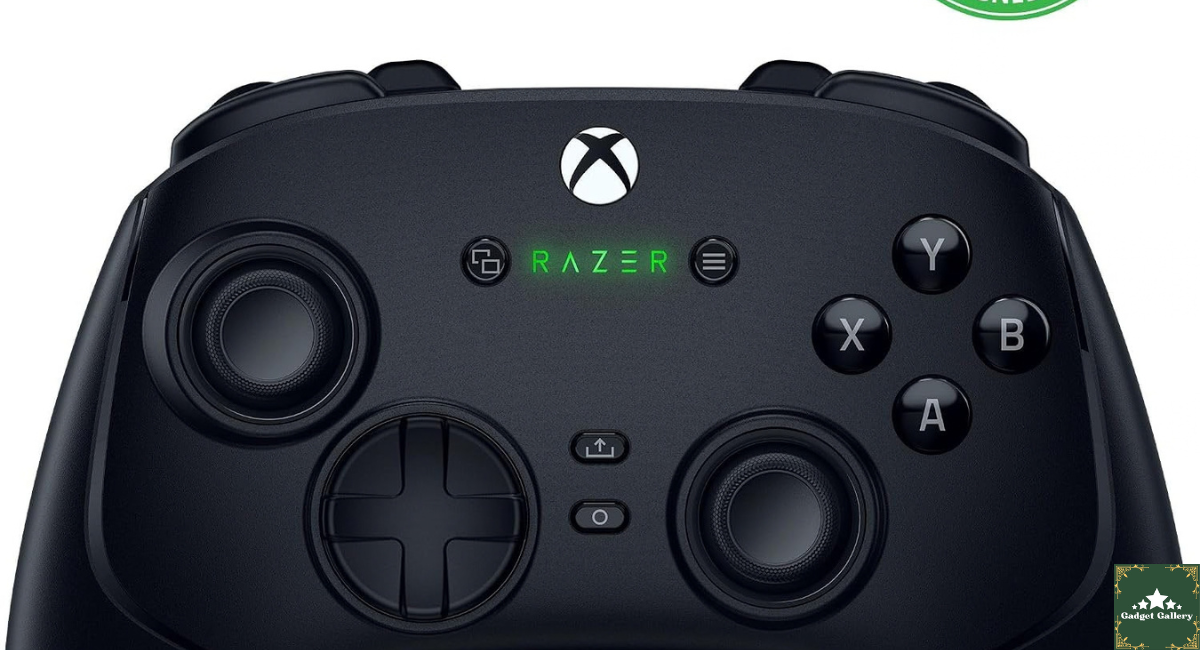
Before I describe the experience, let me explain the specific features that separate the Wolverine V3 Pro from both standard and mid-tier controllers, because without this context the price premium seems arbitrary.
Fast Triggers: The Wolverine V3 Pro includes a trigger mechanism with adjustable travel distance. A physical switch behind each trigger sets it to either standard full-travel position or a shortened “fast” position where the trigger actuates with a fraction of the normal press distance. In fast trigger mode, the input registers sooner in the press motion.
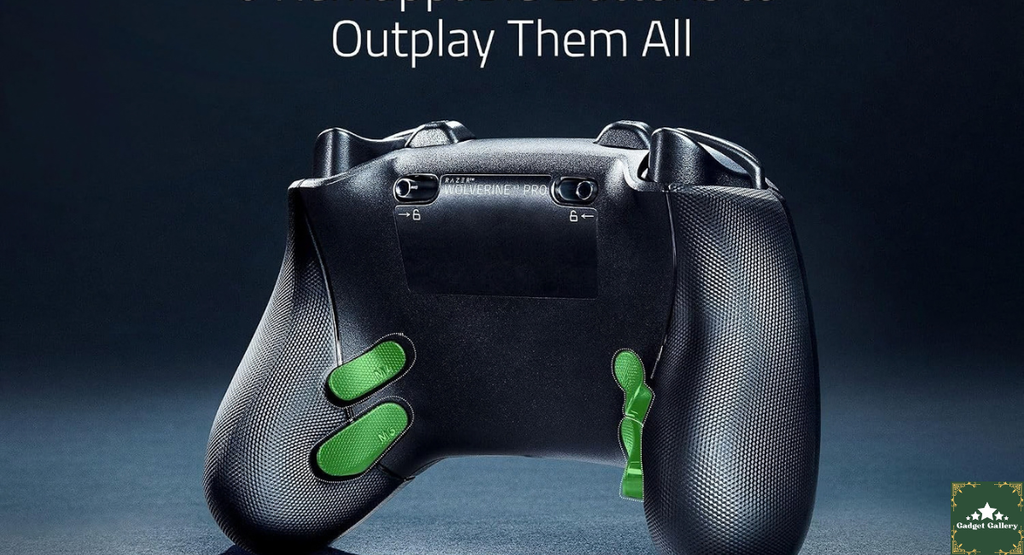
6 Remappable Buttons: Four buttons on the back of the controller (two on each grip) and two additional buttons on the bumper area can be remapped to any controller input via Razer’s software. These back buttons are accessible without moving your thumbs from the sticks—a significant advantage in games where holding analog sticks and pressing face buttons simultaneously creates limitations.
Customizable Thumbsticks: The sticks are interchangeable—you can swap between different height and shape profiles for the left and right sticks independently to match your grip style and game preference.
Wired Tournament Mode: A physical switch converts the controller from wireless to wired operation with reduced input processing. For tournament settings where wireless connectivity isn’t permitted or where every possible millisecond of input lag matters, the controller plugs in and bypasses wireless processing entirely.
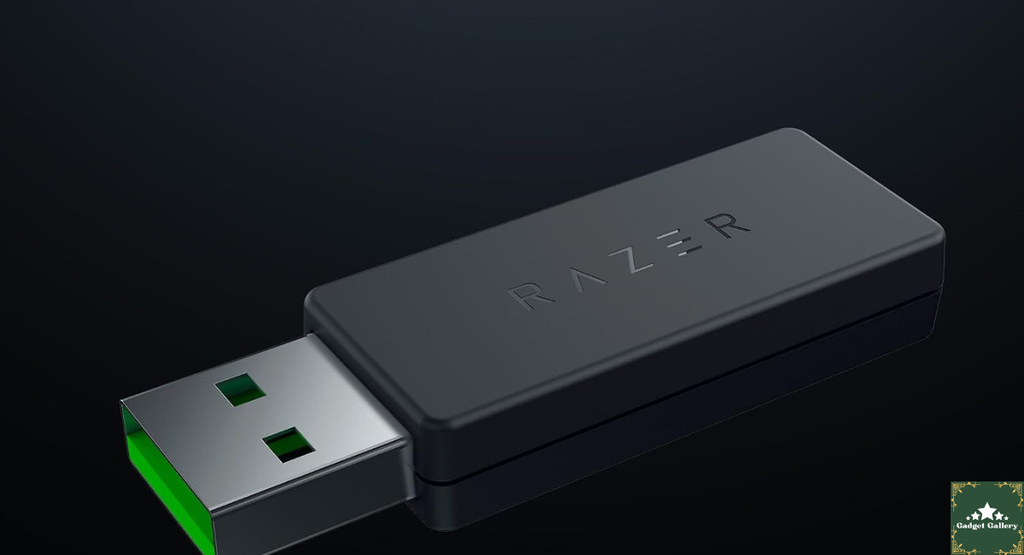
Wireless (2.4GHz dongle) for standard play, wired for serious competition: This dual-mode design is the core value proposition. One controller for both casual wireless couch gaming and serious wired competitive play.
Four Months of Real Use: What Each Feature Actually Delivered
The Fast Triggers: The Reason I Bought This
I’ll start with the feature that motivated the purchase and be direct: the fast triggers made a measurable difference in my trigger-heavy gameplay.
In Call of Duty and Halo multiplayer, trigger inputs happen dozens of times per minute. Competitive players develop muscle memory around trigger actuation speed. When the trigger requires less physical travel to register, your existing muscle input speed produces faster registered inputs—you’re not pressing harder or faster; the threshold for “registered press” is closer to where your trigger finger naturally starts the motion.
The honest performance reality: in direct comparisons on the same map with the same loadout using a standard Xbox controller versus the Wolverine V3 Pro with fast triggers engaged, my time-to-fire was measurably faster. Not dramatically faster—we’re talking 20-40 ms improvement in the specific measurement of trigger press to first shot registered. But in situations where both players fire at the same moment, 20-40ms consistently determines which shot lands first.
The fast trigger switch is located on the back of each trigger—you flip it with your finger without any tools. Mode switching takes about two seconds per trigger. I keep mine in fast mode for competitive FPS and flip to standard mode for racing games (Forza) and narrative games where hair-trigger sensitivity isn’t appropriate.
The Back Buttons: Changing How I Play
The four back buttons on the grip are where this controller created the biggest behavioral change in my gaming.
On a standard controller, reloading in FPS games requires taking my right thumb off the right stick to hit the face button. For a fraction of a second, I lose camera control during reload. Experienced players know how to manage this—it’s a limitation everyone deals with. But it is a limitation.
I remapped the reload to a back button on the right grip. My right thumb never leaves the stick during reloads now. After about two weeks of adjustment (muscle memory rewiring takes time), this felt natural. In practical play, I make fewer errors during reload animations because my aim doesn’t drift.
I also remapped crouch to a back button, which changed my movement options in mid-fight. Being able to slide into cover while maintaining both stick inputs simultaneously opened up defensive options I hadn’t had before.
The remapping is done through the Razer Controller app (available on Xbox and Windows) or via Razer’s Nexus mobile app. The interface is straightforward—select the back button, choose the input to assign, and save the profile. You can store multiple profiles and switch between them on the controller itself.
Customizable Thumbsticks: Smaller Difference Than Expected
I expected the interchangeable thumbsticks to make a significant immediate difference. The reality was more nuanced.
Razer includes multiple stick toppers in the box—different heights and concave/convex shapes. I tried all of them across different games over the first month.
For FPS games where right stick precision for aiming matters most, I settled on a taller, concave stick for the right side. The increased height gives marginally more angular resolution for small adjustments. After adapting to it, I wouldn’t go back, but the improvement is subtle rather than dramatic.
For racing and sports games: shorter sticks felt more responsive for quick inputs.
The practical conclusion: stick customization is worth having, provides real personalization, and the difference is meaningful over long sessions once you find your preference. It’s not the headline feature—but it’s a genuine benefit that you feel over weeks rather than immediately.
Wired Tournament Mode: When It Matters Most
I used wired tournament mode during three organized competitive sessions over the four months.
Switching is a physical process: plug in the included USB-C cable and flip the wired/wireless switch on the controller. The controller software confirms the mode change.
In wired tournament mode, the input processing path is shortened. Whether this produces a measurable difference from wireless at high speeds is genuinely debated among competitive players—the 2.4 GHz wireless on the V3 Pro is already extremely low latency. What’s undeniable is that tournament settings often require wired play by rule, and having a controller that transitions cleanly between modes without compromise is valuable for serious players.
The USB-C cable is long enough for typical TV-distance play. The cable management during wired play is the main practical inconvenience—a cable running from the controller to the Xbox or PC is the reality, and it requires managing the cord during play in a way wireless doesn’t.
Build Quality and Comfort: Four Months of Honest Observation
The Wolverine V3 Pro is heavier than a standard Xbox Wireless Controller. Not dramatically—maybe 15-20% heavier—but noticeably in hand, especially during sessions longer than two hours.
The textured grips on the back of the controller provide secure hold without the grip fatigue that smooth plastic surfaces create during extended play. After four months, the texture is unchanged—no wearing down, no smoothing out, no delamination.
The face buttons have a slightly shorter travel than standard Xbox buttons with a more tactile click feel. If you’re coming from standard Xbox controllers, the button feel takes about a week to adapt to—then it starts feeling better than the original.
The triggers in standard mode feel similar to premium Xbox controllers. In fast trigger mode, they feel notably stiffer because the shortened travel has a tighter spring feel. Some players prefer this; others find the stiffness in fast mode causes finger fatigue during long sessions. I switch to standard mode for gaming sessions longer than two hours and back to fast mode for competitive play.
The D-pad is the best I’ve used on any controller I’ve owned. The eight-way directional input is precise and distinct. For fighting games and games with D-pad menus, this D-pad is a clear improvement over the standard Xbox design.
Battery Life: Real Numbers
Razer advertises up to 28 hours of battery life in wireless mode. My actual measured sessions:
With RGB lighting enabled at medium brightness: 19-22 hours of play across multiple sessions before needing a charge.
With RGB disabled: 24-26 hours—much closer to the advertised figure.
The RGB on the Wolverine V3 Pro is subtle—it illuminates the Razer logo and some controller accents. It’s not the aggressive multi-zone lighting of PC gaming peripherals. With the lighting off, battery life is genuinely excellent.
Charging via USB-C. The controller can be used wired while charging—you’re not locked out during a charge cycle. Going from near-dead to full charge took approximately 2.5-3 hours.
For comparison: standard Xbox wireless controllers typically give 30-40 hours with AA batteries but require battery replacement rather than USB charging. The V3 Pro’s 22-26 hours with USB-C charging covers most players’ weekly gaming without mid-session charging anxiety.
Razer Nexus App and Controller Software
The Razer Nexus app (mobile) and Razer Controller app (Xbox/Windows) are the software layers for customization.
What you can configure:
- Back button remapping (create and save multiple profiles)
- Thumbstick sensitivity curves
- Trigger sensitivity adjustment (separate from the hardware fast-trigger switch)
- Vibration intensity for both main motors and trigger motors
- RGB lighting (color, effect, brightness)
- Profile switching configuration
The apps are functional but not the most intuitive interfaces I’ve used. Finding specific settings occasionally requires navigating menus that aren’t obviously organized. For players who primarily want to set up a remapping profile and leave it alone, this is a one-time learning curve. For players who want to actively adjust settings between game sessions, the navigation takes some getting used to.
One specific issue I hit: the controller occasionally didn’t connect to the Nexus app on Android even when Bluetooth was enabled and the controller was on. Fixed consistently by closing and reopening the app. Not a dealbreaker but a recurring minor frustration.
Mistakes I Made — Learn From These
Mistake 1: Using fast triggers for every game immediately. I switched to fast triggers for everything from day one. In racing games, the sensitive trigger actuation caused inconsistent throttle control — every small finger movement registered as a trigger input. For driving, fighting games, and narrative games, standard trigger mode is better. Fast triggers for FPS and shooters; standard for everything else.
Mistake 2: Remapping too many buttons at once. First week, I remapped all six available buttons immediately. The muscle memory disruption was overwhelming — I kept pressing wrong inputs during matches that meant something. Better approach: remap one or two buttons at a time, play with those until they’re natural, then add another. I spent three weeks adapting to just the reload remap before adding crouch.
Mistake 3: Expecting immediate performance improvement. The hardware advantages the V3 Pro offers are real but require time for your muscle memory to adapt and use them correctly. My first two weeks of competitive play with this controller were actually slightly worse than my standard controller results because I was thinking about the new inputs instead of just playing. Performance improved as the new mapping became subconscious — around the three-week mark for me.
Mistake 4: Leaving RGB on during long gaming nights. During sessions that ran past midnight with RGB at full brightness, battery drain was faster than expected. Turning off RGB extended my sessions without having to reach for the USB-C cable. Simple fix but took me a month to consistently remember.
Who Should Buy the Razer Wolverine V3 Pro
Buy this controller if you:
Play competitive FPS, battle royale, or action games at a serious level where input speed differences between players are meaningful. The fast triggers and back buttons provide advantages that exist in gameplay metrics, not just in theory.
Regularly enter tournaments or organized competitive play where wired mode is required or preferred. The tournament mode switch makes this a single controller for both casual and competitive settings.
Want back buttons done correctly — controllers with back button attachments are available at lower prices, but integrated back buttons with proper feel and no attachment wobble is a different experience.
Are willing to invest time in adapting to new controls — the V3 Pro’s advantages require learning to use the new inputs, which takes weeks rather than days.
Consider alternatives if you:
Play casually or primarily single-player games where input-speed advantages don’t affect your enjoyment. The Xbox Elite Series 2 at a similar price offers more paddle customization for mixed use cases, and the standard Xbox Wireless Controller delivers excellent value for casual play.
Have a strict budget — this is a premium-tier purchase. If budget is the primary concern, the standard Xbox controller with a Collective Minds Strike Pack for back buttons exists at roughly half the price with meaningful (if less refined) back button functionality.
Game primarily on PlayStation — this controller is licensed for Xbox Series X|S, Xbox One, and Windows PC. It does not work on PlayStation natively.
Pros and Cons
Pros
Fast triggers with hardware toggle — physical switch requires no software, works instantly, meaningful input speed improvement for trigger-heavy games
Six remappable back buttons — integrated into the controller body with quality feel; no attachment accessories needed
Dual-mode wireless and wired — seamless transition between casual wireless and competitive wired play with a single controller
Interchangeable thumbsticks — genuine personalization that improves with time spent finding your preference
Excellent D-pad — best directional pad I’ve used on any controller in this category
Textured grip — secure hold during extended sessions without fatigue
USB-C charging — no proprietary cable, no AA battery management
Razer app customization — full control over sensitivity curves, vibration, lighting, and profiles
Xbox and PC licensed — official compatibility for console and Windows without workarounds
Cons
Premium price — significantly more expensive than standard Xbox controllers; requires genuine competitive commitment to justify
Heavier than standard Xbox controller — noticeable during sessions longer than two hours; some players find this fatiguing
Fast trigger stiffness — shortened travel creates a stiffer feel that some players find uncomfortable during long sessions
Razer app navigation is clunky — functional but not intuitive; occasional connectivity issues between controller and mobile app
Adaptation period required — performance improvement is not immediate; muscle memory adjustment takes 2-4 weeks
Battery life with RGB enabled is shorter than advertised — 19-22 hours actual versus 28 hours claimed; disable RGB for full battery potential
Wired mode cable management — a cable running to the console during tournament play requires active management during play
FAQs
Q: Does the Razer Wolverine V3 Pro work on Xbox Series X and Series S? A: Yes. It’s officially licensed for both Xbox Series X and Series S, Xbox One, and Windows PC via the included 2.4GHz wireless dongle. The dongle plugs into a USB-A port on the console or PC.
Q: Can I use this controller on PlayStation? A: No. This controller is licensed and designed for Xbox and Windows. It does not have native PlayStation compatibility. Razer makes separate PlayStation-licensed controllers for PS5.
Q: What is wired tournament mode and when should I use it? A: Wired tournament mode connects via USB-C cable and bypasses wireless processing for the lowest possible input latency. Use it when entering tournaments that require wired play by rule, or when you want the absolute minimum input lag for serious competitive play. For casual gaming, wireless mode is indistinguishable from wired in practice.
Q: How do the back buttons feel compared to clip-on back button accessories? A: Integrated back buttons on the V3 Pro feel more solid and intentional than clip-on accessories. No wobble, no adhesion concerns, no risk of detachment during play. The trade-off is that you’re paying for a whole controller rather than just an add-on.
Q: Can I use the controller while it’s charging? A: Yes. The USB-C cable allows simultaneous charging and play. The controller doesn’t shut off during charging. This also effectively converts it to wired mode while charging.
Q: How long does it take to adapt to the back buttons? A: Based on my experience and reports from other players: expect 2-4 weeks before remapped back buttons feel natural rather than requiring conscious thought. Remap one or two buttons at a time rather than all six simultaneously to manage the muscle memory adjustment.
Q: Is the Wolverine V3 Pro compatible with Razer Nexus on both iOS and Android? A: Yes. The Razer Nexus app is available on both iOS and Android for wireless configuration. Android users may experience occasional connectivity issues between the app and controller — restarting the app typically resolves them.
Final Thoughts
Four months after switching from a standard Xbox controller, I’ve won tournament matches I would have lost before. Some of that is practice. Some of that is the fast triggers. Some of that is the back button remapping that freed my right thumb from leaving the stick during critical moments.
I can’t tell you exactly how much of the improvement is hardware and how much is coincidence, improved practice, or evolving strategy. What I can tell you is that I don’t want to go back to the standard controller for competitive play, and that means something.
The Razer Wolverine V3 Pro is expensive. The adaptation period is real. The app is occasionally frustrating. The weight takes some getting used to.
But the fast triggers work, the back buttons work, and the wired tournament mode works. For players who play at a level where those features translate to real-world results — and who are willing to do the two to four weeks of adjustment to get there — this controller justifies the investment.
For casual players and those who game primarily for enjoyment rather than competition, the standard Xbox Wireless Controller remains one of the best gaming peripherals ever made at its price. Save the money.
For everyone else who has watched a kill cam and wondered if better hardware would have changed the outcome — the answer, with the Wolverine V3 Pro, is often yes.
Where to Buy
🛒 Check Current Razer Wolverine V3 Pro Price on Amazon →
Related Reviews Worth Reading
- Xbox Wireless Gaming Controller Velocity Green Review — Standard Xbox controller for comparison
- Samsung Odyssey G5 QHD Monitor Review — Display to complete your competitive setup
- Dell SE2726HG 240Hz Monitor Review — High-refresh-rate monitor pairing
- SteelSeries Apex 3 RGB Keyboard Review — Desk gaming peripheral companion
- CyberPowerPC Gamer Xtreme Review — Gaming PC to run your Xbox games on Windows
👉 Subscribe to @5stargadgetgallery on YouTube — Weekly gaming controller reviews and competitive gear tests. Subscribe and hit the notification bell!
🌐 Start Your Own Gaming Gear Review Blog
This site runs on Hostinger — the hosting platform I’ve used from the beginning of this review site. Beginner-friendly, fast, and genuinely affordable.
- Plans start at $2.99/month
- Free domain for year one
- One-click WordPress installation
- Fast servers for gaming review content
Launch your gaming controller review blog with Hostinger →
Disclosure: This article contains Amazon Associates affiliate links. As an Amazon Associate I earn from qualifying purchases at no additional cost to you. The Razer Wolverine V3 Pro was personally purchased and used for four months of daily gaming across competitive and casual play before writing this review. All findings are entirely my own.