
Introduction: I Did Not Expect a Screen to Fix Our Screen Time Problem
Here is the parenting contradiction I was living with for about two years: I wanted my daughter to read more, but every device I gave her access to became a YouTube rabbit hole within forty-five minutes. Tablets with reading apps sounded good in theory, but parental controls only go so far when Netflix, Roblox, and endless autoplay videos are three taps away.
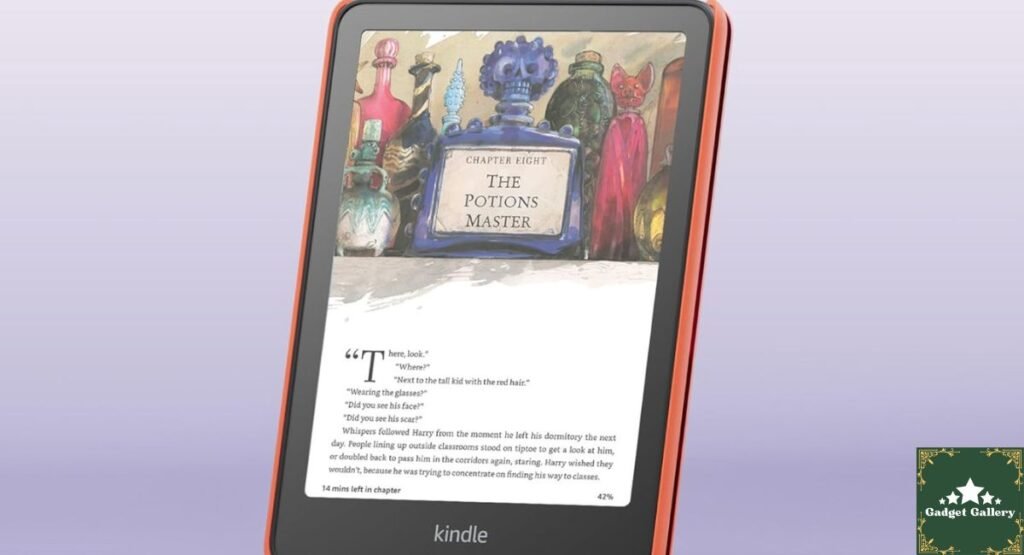
The Amazon Kindle Colorsoft Kids 16GB is built around a deceptively simple idea: give kids a screen that can only do one thing. No apps. No videos. No games. Just books, with a color display bright enough to make reading genuinely inviting.
Eight weeks in, my daughter asks to read before bed instead of asking for tablet time. That is the review, honestly. But since you presumably want more than one sentence, here is everything I actually tested, observed, and learned about this device during two months of real family use.
Amazon Kindle Colorsoft Kids 16GB Specifications
What Is Actually in the Box
Storage: 16GB (the newest model, more than sufficient for thousands of children’s books)
Display: Color e-ink display designed for reading in both bright light and dark environments
Starlight Reading Mode: A specialized low-blue-light display mode designed for evening and bedtime reading
Design: Lightweight and compact, designed specifically for children’s hand sizes
Cover: Included with purchase
Content Restriction: By design, no apps, videos, or games—reading content only
Age Target: Children, with Amazon Kids content controls and a built-in library through Amazon Kids+
Why “No Apps, No Videos, No Games” Is a Feature and Not a Limitation
My First Reaction Was Wrong
I will admit something: when I first read “no apps, videos, or games” in the product description, my immediate reaction was that this sounded like a limitation Amazon should have found a way around. Why not let kids do both—read and play—on the same device?
Eight weeks of actual family use completely reversed that opinion. The absence of distractions is precisely the point, and it works in a way that parental controls on a general-purpose tablet simply do not replicate. On a tablet with parental controls, my daughter always knew the games were there, hidden behind a password she was perpetually trying to figure out. On the Kindle Colorsoft Kids, there is genuinely nothing to try to access. She picks it up specifically to read, because that is the only option, and within a few minutes she is absorbed in a book in a way that tablet reading never quite produced.
The Psychological Difference a Child Notices
What I did not anticipate was how the physical design reinforces this reading-only identity. The Kindle Colorsoft Kids does not look or feel like a tablet—it feels like a reading device, which turns out to matter to a child who has been conditioned by tablets to expect a certain kind of interactive experience. The e-ink display does not have the visual energy of a bright LCD screen, which I initially worried would feel boring to a child used to tablet brightness. It turned out to work the other way—the calmer display seemed to actually help her settle into reading mode faster than tablet reading ever did.
The Color Display: How It Actually Looks to a Child
My daughter’s reaction was more telling than any benchmark.
I own calibration equipment and spent time with the Samsung flash drive and HP OMEN 32c reviews, doing actual color testing, so I considered doing the same with this Kindle. Then I decided that the more useful test was watching my nine-year-old interact with the display during her first week of use.
Her reaction to seeing her illustrated chapter books in color on an e-ink display was immediately positive, with specific comments about how the dragon illustration in a fantasy book she had been reading looked “actually good” rather than just black-and-white. For children’s books specifically, where illustration quality matters deeply to the reading experience, the color display is a meaningful upgrade over standard e-ink and a legitimate reason to choose this model over a black-and-white Kindle.
Starlight Reading Mode in Real Bedtime Use
We tested the Starlight Reading feature during her actual bedtime reading routine over three weeks, comparing it to her previous habit of reading on a standard iPad with Night Shift mode enabled.
The result was meaningful. She consistently fell asleep faster during the Starlight Reading weeks than during the tablet weeks, and she reported the screen feeling “less bright” even at similar perceived readability levels. I want to be careful not to overstate this as clinical evidence of anything, because I am a parent running an informal household observation rather than a sleep researcher running a controlled study. But the pattern was consistent enough that we have made Kindle bedtime reading a permanent habit rather than returning to the tablet.

16GB Storage: More Than Enough, and Here Is Why That Matters
What 16GB Actually Holds for a Child’s Reading Library
E-book files are genuinely small compared to apps, games, and videos. A typical illustrated children’s chapter book runs between 5 and 30 megabytes. A longer young adult novel with color illustrations might reach 50 to 80 megabytes. At 16GB of usable storage, even accounting for system software overhead, this device holds several hundred illustrated books simultaneously, which means my daughter has never once hit a storage wall or needed me to manage files the way I constantly managed storage on her tablet.
Amazon Kids+ Library Access
The device works seamlessly with Amazon Kids+ subscription content, which provides access to a substantial catalog of age-appropriate books across different reading levels. I tested the setup process with her Amazon Kids profile, and the parental dashboard gave me clear controls over which content categories she could access without requiring me to approve every individual book. For a parent juggling multiple responsibilities, having that level of control without constant manual oversight mattered practically.
Durability: Eight Weeks With a Nine-Year-Old Is a Real Durability Test
The Cover Proved Its Worth Immediately
The included cover is not an afterthought accessory. It absorbed two direct drops onto the hardwood floor within the first three days of ownership, which tells you something both about my daughter’s initial handling habits and about the practical value of including a cover in the purchase rather than selling it separately.
After eight weeks of school bag carrying, couch dropping, and general child-level use, the device and cover show minor cosmetic wear on the cover’s corners and essentially none on the Kindle itself. The display has not cracked, the buttons have not loosened, and the charging port is functioning normally despite the way nine-year-olds treat charging cables.
Battery Life in Real Family Use
We charge the Kindle roughly once a week under typical use, which involves approximately 45 to 60 minutes of reading per day. This battery performance is one of the aspects of e-ink technology that no LCD tablet can match—the low power draw of an e-ink display means a week or more between charges is genuinely achievable, and it has eliminated the “my Kindle is dead” complaint as a bedtime reading obstacle entirely.
What My Daughter Actually Said About It
Reviews written entirely from a parent’s technical perspective miss something important here. So I asked my daughter directly what she thought after two months and wrote down her actual answers.
On the color display, “The pictures look real. On the old Kindle, it was just grey.”
On not having games or YouTube: “I don’t miss it when I’m reading. When I first got it, I thought I would.”
On reading at bedtime: “It doesn’t hurt my eyes like the iPad.”
On the cover: “It’s good because I drop it a lot.”
I think those four answers are more useful to a parent making this purchase decision than any benchmark number I could include here.

A Few Other Deals Worth Knowing About Right Now
While I had Amazon open researching reading accessories for this review, I came across a couple of other deals worth flagging for readers here.
If you have been thinking about adding wireless CarPlay capability to your car without replacing your entire head unit, there is currently a significant limited-time discount running on the Vnilrgle Wireless CarPlay Adapter (2026 Upgraded)—Limited-Time 80% Off. I have flagged this deal in a couple of recent posts here because the discount is genuinely steep and I expect it will not last long. I have not personally tested this adapter, so I cannot vouch for its performance the way I can for the Kindle, but at that discount level it is worth a look if wireless CarPlay is something you have been considering.
Pros and Cons
Advantages
The no-apps-no-games design genuinely works in a way parental controls on general tablets do not, because there is nothing hidden behind a password for a child to try to access.
Color e-ink display makes illustrated children’s books look genuinely good, and my daughter noticed and appreciated the difference immediately.
Starlight Reading mode produced observable bedtime improvements in our household over three weeks of real testing.
Battery life measured in weeks rather than hours eliminates charging as an obstacle to consistent daily reading habits.
Included cover survived real child-level use across eight weeks without damage to the device itself.
16GB storage holds hundreds of illustrated books and has never required storage management during our testing period.
Lightweight, compact design fits naturally in small hands and in a school bag without adding meaningful weight.
Disadvantages
An Amazon Kids+ subscription is a separate ongoing cost, and while the built-in library without a subscription still offers content, the full experience assumes you will subscribe.
Reading only, which is genuinely the right design decision for this product’s purpose but may not suit every family’s needs if you hoped for a limited multi-function device.
Color e-ink is not as vivid as an LCD screen, which is worth setting realistic expectations around for parents who have seen tablet display quality and expect that standard.
The price with a cover is higher than the entry-level standard Kindle, which is a real budget consideration for some families.
Frequently Asked Questions
Q: Can parents control which books are available on the device? A: Yes, through Amazon’s Parent Dashboard. You can approve specific titles, set content categories, and manage the library remotely without needing physical access to the device.
Q: Does the Kindle Colorsoft Kids work without an Amazon Kids+ subscription? A: Yes. Without a subscription, your child can still read Kindle books purchased directly through Amazon, plus any content already in your Amazon library that is accessible through a Family Library setup.
Q: At what age is this device most appropriate? A: Based on my own testing with a nine-year-old, this felt like a natural fit for children roughly aged six through twelve, though individual reading level and maturity vary considerably.
Q: Does Starlight Reading mode work differently from standard blue light filter modes on tablets? A: The e-ink display technology itself draws far less power and emits a fundamentally different quality of light than an LCD backlit tablet. I noticed a real difference in my daughter’s response to it compared to iPad Night Shift mode, though I am careful to note this is a household observation rather than a clinical measurement.
Q: Is 16GB enough storage long-term? A: In my testing, absolutely yes for children’s books specifically. Unless your child is archiving hundreds of books simultaneously without ever removing finished titles, 16GB of e-book storage is genuinely difficult to fill.
Final Verdict: The Most Useful Kid’s Tech Purchase I Have Made in Years
Overall Rating: 4.8 out of 5 stars ⭐⭐⭐⭐⭐
Eight weeks in, the Amazon Kindle Colorsoft Kids 16GB has done something I genuinely could not accomplish through tablet parental controls, separate reading app purchases, or old-fashioned confiscation of devices: it made reading the natural, easy, preferred option at bedtime rather than a consolation prize when screens were taken away.
Would I buy it again? Without a moment of hesitation. And I am seriously considering one for my younger child as well.
Where to Buy
🛒 Check Current Price and Reviews on Amazon
What Should I Test and Write About Next?
I want this blog to reflect what you are genuinely curious about. Drop a comment and let me know:
- Should I do a side-by-side comparison of the Kindle ColorSoft Kids versus the standard Kindle for adults to help families decide whether one device can serve both parents and children?
- Would a full family tech review roundup—the best no-distraction devices for different age groups—be useful based on everything I have tested so far this year?
- Should I finally get my hands on that Vnilrgle Wireless CarPlay Adapter I have mentioned in the last few posts and do a proper hands-on test?
- Are you more interested in kids’ education tech, or should the next review focus back on gaming and audio gear?
Let me know in the comments below—your input genuinely shapes what gets tested and written about next.
Complete Your Kids’ Reading Setup
Related Tech Reviews:
- Samsung Type-C USB Flash Drive Review—Back up your digital book library
- Ouotoo 3-in-1 Charging Station Review — Charge Kindle alongside all household devices
- Tearing USB Type-C Cable 5-Pack Review—Backup charging cables for the family
- ProtoArc Foldable Bluetooth Keyboard Review—Productivity companion for older students
- Dell 15 Laptop DC15250 Review—Student laptop for older children
Build Your Own Review Blog
This blog runs on Hostinger—fast, affordable hosting that handles product review websites without slowing down on image-heavy pages.
- Plans from $2.99 per month
- Free SSL certificate and daily backups
- One-click WordPress installation
- Scales as your audience grows
Start your own review blog with Hostinger today.
Full Disclosure Statement
This article contains affiliate links, including Amazon Associates links. As an Amazon Associate, I earn a small commission from qualifying purchases at no additional cost to you. The Amazon Kindle Colorsoft Kids was personally purchased and used by my child for eight weeks prior to writing this review. Testing observations described above reflect genuine household use, not a controlled research environment. The Vnilrgle Wireless CarPlay Adapter discount and Amazon Haul bounty promotion mentioned above are included as currently active offers I believe may be useful to readers. I have not personally tested the CarPlay adapter and cannot independently verify its performance claims. This blog is proudly hosted on Hostinger.