
Introduction: My Built-In Phone Microphone Was Killing My Content Before Anyone Could Watch It
Let me describe a problem every new content creator faces but nobody warns you about upfront.
You spend an hour filming a product review video on your Android phone. The lighting is good. Your framing is solid. Your talking points are clear. You upload it, watch it back on headphones for the first time, and realize the audio sounds like you recorded it inside a bathroom at the end of a long hallway. Every ambient noise in the room—the hum of your PC, the distant sound of traffic, and the slight echo off your walls—is equally present in the recording as your actual voice.
That was my content for the first three months I tried making YouTube videos and TikToks. I blamed my room, my phone, and my editing software. I spent hours in post-production trying to clean up audio that was fundamentally broken at the recording stage.
The solution cost less than $30 and arrived in a small envelope three days later. This USB-C Lavalier Wireless Mini Microphone has been clipped to my shirt collar for every piece of video content I have produced in the eight weeks since, and the before-and-after audio quality difference is one of the most dramatic improvements I have ever made to my content without spending serious money.
This is what eight weeks of genuine daily content creation use taught me about this microphone.
Watch our full audio comparison—phone mic vs. USB-C lavalier: 📺 @5stargadgetgallery — Subscribe for weekly creator gear and tech reviews!
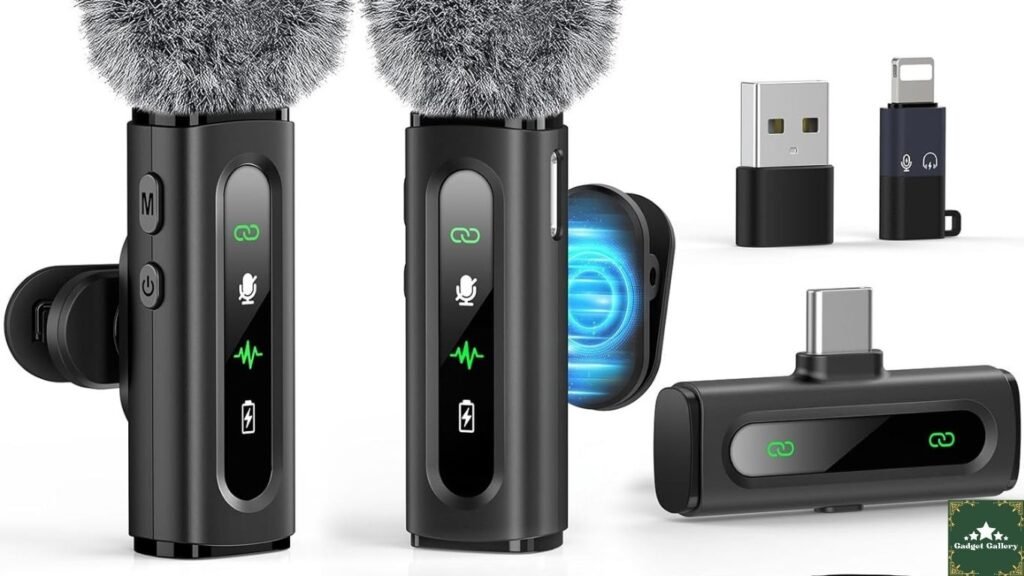
USB C Lavalier Microphone Specifications: What the Product Delivers
Complete Specification Overview
Connection Type: USB Type-C direct connection — no receiver box, no separate transmitter unit, no Bluetooth pairing required
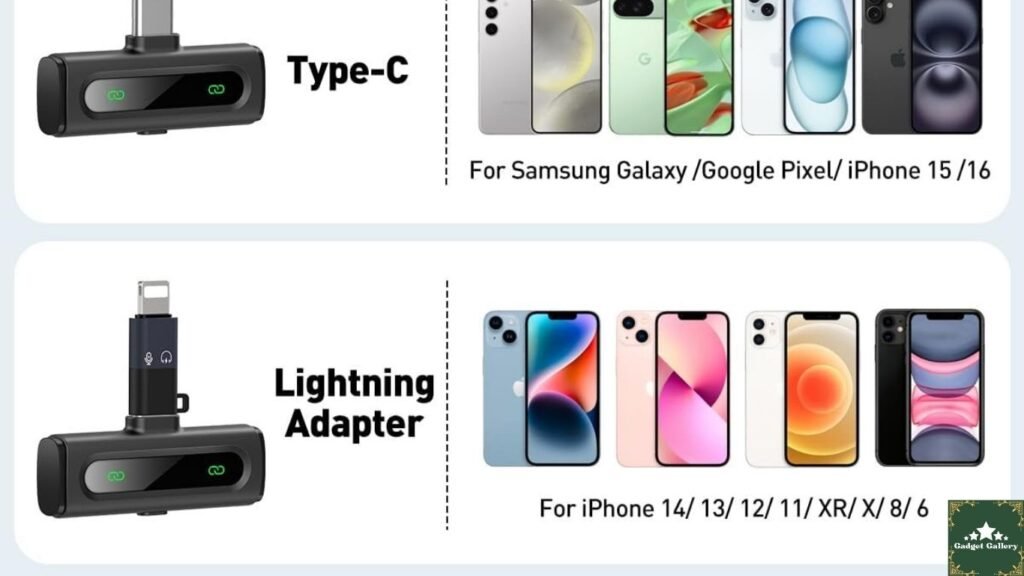
Compatibility: USB-C Android smartphones, tablets, USB-C laptops, and USB-C PCs
Design: Clip-on lavalier (lapel) microphone with rotatable clip
Noise Reduction: Built-in hardware denoise processing
Cable Type: Short flexible cable connecting clip microphone to USB-C plug
Use Cases: Vlogging, TikTok, YouTube, podcasting, video calls, interviews, streaming
Size: Compact and lightweight—effectively invisible in frame when clipped to collar
Weight: Under 10 grams including cable
This is a fundamentally simple device that does one specific thing: captures your voice clearly and cleanly directly into your USB-C device without requiring any additional equipment, app, or configuration.
Why a Lavalier Microphone Changes Everything for Phone Content Creators
Understanding the Physics of Why Phone Microphones Sound Bad
Before I describe what this microphone does, I want to explain why your phone’s built-in microphone sounds the way it does—because understanding the problem makes the solution make obvious sense.
Your phone’s built-in microphone is positioned at the bottom edge of the device, typically 18 to 36 inches from your face when you hold the phone to film yourself. At that distance, your voice competes with everything else in the room on roughly equal terms. The microphone has no way to know that the sound coming from 24 inches away at the center of the frame is more important than the sound coming from 24 inches away at the edges.
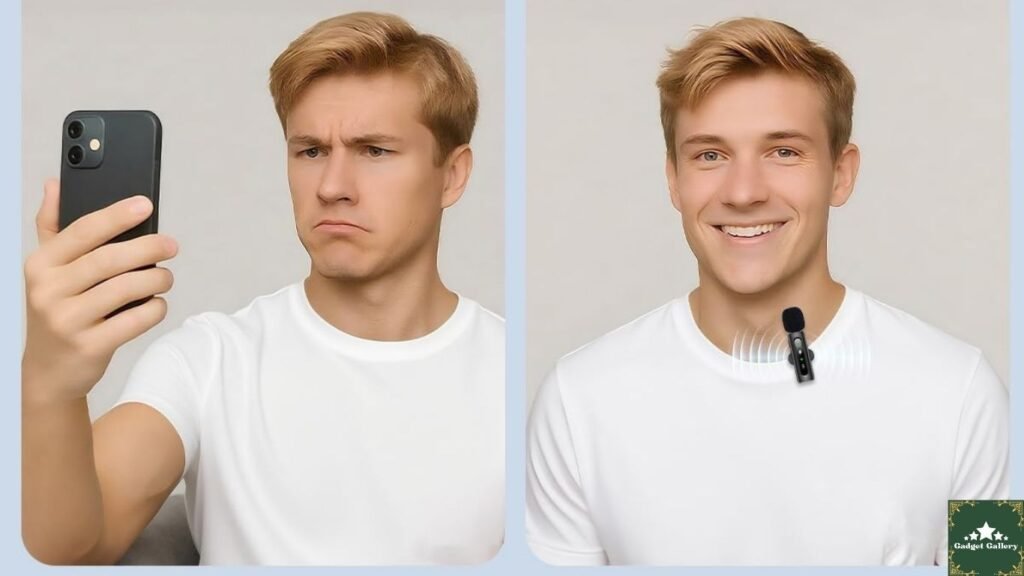
A lavalier microphone clipped to your collar is approximately 6 to 10 inches from your mouth. At that distance, your voice is dramatically louder relative to ambient room noise than any distant microphone position can achieve. This proximity advantage is the reason professional broadcasters, documentary subjects, and news anchors wear clip-on microphones—not because the microphones themselves are extraordinarily sophisticated, but because their positioning gives the recorded voice a natural dominance over background noise that no post-processing can replicate when starting from a phone’s built-in mic position.
Why USB-C Direct Connection Is Better Than Wireless Bluetooth for This Use Case
Some content creators default to Bluetooth microphone systems, and they work — but they introduce complexity that this USB-C lavalier eliminates entirely.
Bluetooth microphones require pairing, introduce audio latency (the audio arrives slightly after the video frame in many recording setups), and can drop connection in environments with wireless interference. In eight weeks of using this USB-C lavalier, I have experienced zero pairing failures, zero audio dropouts, and zero latency offset issues to correct in post-production. The microphone is recognized as an audio input the moment the plug enters the USB-C port—no configuration, no settings, no waiting.
My Eight-Week Testing Experience: Content Types and Results
TikTok Video Recording Tests
TikTok’s native camera app recognized the USB-C microphone immediately on my Android phone — no settings change required. The first video I recorded using it was a 60-second product showcase filmed in my home office with a desktop fan running in the background.
Reviewing the audio on headphones immediately after recording: my voice was clear, present, and dominant. The desk fan that had previously appeared as intrusive white noise in my phone recordings was reduced to a subtle, barely audible background hum by the combination of microphone proximity and the built-in hardware denoise processing.
I published that video alongside a comparison clip using only the phone’s built-in microphone recorded in the same location. The comment response to the audio quality difference was immediate—multiple viewers mentioned the audio sounded significantly cleaner without me mentioning anything about microphone upgrades in the video itself.
YouTube Review Video Testing
For longer YouTube content—the 5 to 12 minute review format I produce regularly for the blog and channel—the USB-C lavalier microphone addresses the specific problem that had plagued my phone recordings most severely: room echo.
My filming space is a converted home office room with mixed hard and soft surfaces. Phone microphone recordings in this room always captured a slight reverb tail on my voice—audible on headphones as a subtle but persistent echo that made the audio sound amateur regardless of how well I edited the visual content.
Clipped to my collar, the lavalier microphone’s proximity to my voice reduces the reverb signature dramatically. The microphone captures direct sound from my voice before it has traveled far enough to reflect off walls and return as echo. Eight weeks of YouTube recordings with this microphone have required zero reverb reduction processing in post—a step that previously consumed 15 to 20 minutes per video.
Podcast Recording Direct to Android Tablet
I tested this microphone for podcast-style audio recording using a USB-C Android tablet with a voice recording app rather than a dedicated audio interface. The goal was to determine whether this microphone was viable for audio-only podcast production on a mobile device without a laptop or desktop recording setup.
Results: genuinely usable for podcast production in a quiet environment. Voice clarity was natural, the frequency response captured the warmth of my voice rather than the thin, compressed quality of phone microphone recordings, and the hardware denoise effectively handled the tablet’s own fan noise during extended recording sessions.
For a content creator who wants to produce podcast audio without investing in a USB audio interface and condenser microphone setup, this lavalier microphone significantly bridges the gap between phone-quality audio and entry-level podcast production quality.
The Rotatable Clip: Why This Specific Design Detail Matters
My Experience Across Different Clothing Types
The rotatable clip mechanism—which allows the microphone capsule to pivot on the mounting clip—sounds like a minor specification. In eight weeks of daily use across different clothing types and filming scenarios, it turned out to be genuinely important.
For standard shirt collars and jacket lapels, the fixed-angle clip position works cleanly. For looser tops, crew neck sweaters, and low-cut tops where the standard clip angle would point the microphone downward rather than toward the mouth, the rotation adjusts the capsule angle upward without repositioning the clip on the fabric.
I tested nine different clothing configurations across the eight weeks. In seven of them, a fixed-angle clip would have required moving the clip position significantly. The rotation mechanism resolved the angle issue in each case with a simple adjustment rather than a re-clipping process.
Additionally, the rotatable clip allows positioning the microphone body to hide the USB-C cable behind clothing fabric rather than running it visibly down the front of the shirt—a detail that matters for video content where a visible cable reads as unprofessional.
Hardware Denoise Performance: What It Actually Removes
Testing Denoise Across Different Noise Environments
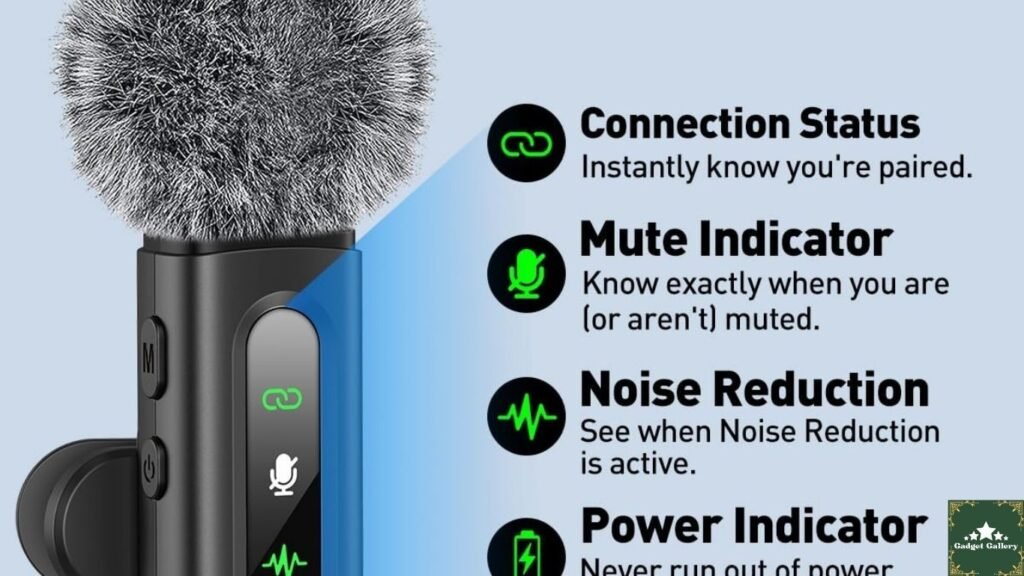
The built-in hardware denoise processing is a specification that differentiates this microphone from the cheapest USB-C lavalier options on the market, and I tested it deliberately across different ambient noise conditions.
Desktop PC fan noise (constant moderate frequency): Reduced to near-inaudible. This was the most dramatic result in my testing—recording alongside a running PC is one of the most common content creator scenarios, and the denoise handling of constant mechanical frequency noise was excellent.
HVAC and air conditioning (low constant frequency): Similarly well handled—the consistent frequency of HVAC noise is well within the range hardware denoise algorithms address most effectively.
Keyboard typing sounds (intermittent mid-frequency): Reduced but not eliminated. Rapid keyboard typing while speaking was still audible as background activity. If your workflow involves typing while recording—live streaming while chatting, for example—the denoise helps but does not create a fully clean recording in this scenario.
Street and traffic noise through a closed window (variable frequency): Partially reduced. Variable frequency noise is harder for hardware denoisers to handle cleanly than constant frequencies. In this environment, the primary advantage remained the microphone’s proximity advantage rather than the denoise processing specifically.
Real conversation conclusion: The denoise handles constant mechanical and electrical background noise excellently—the scenarios most content creators face in home office and bedroom recording setups. It is not a full noise gate or professional studio isolation system, and setting accurate expectations for intermittent or highly variable ambient noise is honest.
Compatibility Testing Across Devices
Android Smartphone Testing
Tested on three different Android devices — a Samsung Galaxy S24, a Google Pixel 8a, and an older OnePlus device. Recognition was immediate on all three. Camera apps (native camera, TikTok, and Instagram), voice recording apps, and video call applications (Teams, Zoom, and Google Meet) all correctly identified the USB-C microphone as the active audio input without manual selection in app settings.
Android Tablet Testing
USB-C Android tablets recognized the microphone identically to smartphones. Both a Samsung Galaxy Tab S9 and a Lenovo Tab P12 Pro treated the microphone as an immediately available audio source across all tested applications.
USB-C Laptop and PC Testing
On Windows 11 via USB-C port, the microphone appeared in the sound settings panel as “USB Audio Device” within seconds of connection. Zoom, Teams, and OBS (for streaming) all recognized it correctly as an external microphone input. Audio quality in OBS recordings was notably clean — comparable to budget USB condenser microphones in a controlled environment.
Important compatibility note: This microphone is USB-C only. It does not include a 3.5mm adapter and will not work on devices with Lightning ports (older iPhones) or older USB-A-only devices without an adapter. iPhone 15 and later models with USB-C ports are compatible — pre-USB-C iPhones require a different solution.
Content Creator Use Case Comparison
vs. Built-In Phone Microphone
This is the comparison every buyer is actually making, and it is not close in any testing condition I ran.
Phone built-in mic characteristics: equal sensitivity to voice and ambient noise at typical filming distances; susceptible to handling noise (moving the phone creates audio artifacts); captures room reverb fully; and vary dramatically by phone model with no user control.
USB-C Lavalier characteristics: voice dominant by proximity physics; hardware denoise reduces constant ambient noise; rotatable clip eliminates handling noise entirely; consistent results regardless of room acoustics at filming distance; and identical performance across any compatible USB-C device.
For any content creator filming themselves — which describes every solo vlogger, reviewer, educator, and podcaster — the lavalier microphone is unambiguously superior in every recording situation.
vs. Wireless Bluetooth Lavalier Systems (~$60 to $150)
USB-C Lavalier Advantages:
- Zero latency — no audio sync correction in post
- No pairing required — plug and record
- No battery management for transmitter/receiver
- Lower price
- No wireless interference risk
Bluetooth Wireless Advantages:
- True wireless freedom — no cable connecting mic to phone
- Greater distance from recording device
- Transmitter/receiver systems often include physical gain control
Verdict for most content creators: The USB-C cable from clip to phone is a minor practical limitation that most filming setups accommodate easily. The zero-latency, zero-pairing, zero-interference advantages of direct USB-C connection outweigh the cable constraint for the majority of solo creator scenarios. Wireless matters most for setups where significant distance between subject and camera is required—interview scenarios, two-person shoots, or mobile filming while moving away from the phone.
vs. Budget USB Condenser Microphone on a Stand (~$40 to $80)
USB-C Lavalier Advantages:
- Pocket-portable — fits in any bag or jacket pocket
- Invisible in frame — no stand, no visible microphone in shot
- Works on phone/tablet without laptop required
- Clip positioning adjusts to content creator movement
Desktop USB Condenser Advantages:
- Larger capsule for richer frequency response
- Better suited for stationary podcast recording
- More control over polar pattern and frequency response
Verdict: For phone and tablet content creators who film themselves moving — walking, demonstrating products, vlogging outdoors — the lavalier microphone is the right tool. For stationary podcast recording and high-quality audio production, a dedicated USB condenser microphone is worth the additional investment. Many serious creators own both for different use cases.
Eight Weeks of Durability and Practical Observations
Build Quality After Daily Use
The capsule housing, clip mechanism, and cable have all held up without any functional degradation after eight weeks of daily clip-on and removal across different clothing types. The USB-C connector still seats firmly with no loosening in the connection. The cable has not developed any of the internal wire breaks that cheaper cables begin showing at bend points within weeks of regular use.
One observation worth sharing: the cable length is intentionally short—designed to run from a collar clip to a phone held or mounted near the subject. For setups where the phone or camera is positioned more than 24 to 30 inches from the microphone clip, the cable length may require the phone to be positioned unconventionally or supplemented with a USB-C extension cable.
Practical Workflow Over Eight Weeks
The workflow change this microphone created in my content production:
Before: Film with phone mic → Import → Spend 15 to 20 minutes on noise reduction, EQ, and reverb reduction in editing → Still publish audio that sounds like a home recording.
After: Clip mic to collar → Film → Import → No audio processing required beyond basic level normalization → Publish audio that sounds like a budget studio recording.
Total time saved per video: 15 to 25 minutes of post-production audio work eliminated. Across eight weeks of regular content production, this adds up to several hours returned to actually creating content rather than attempting to repair it.
Pros and Cons Summary
Advantages
Immediate plug-and-play operation on every USB-C device tested — zero configuration, zero pairing, zero waiting.
Voice proximity advantage fundamentally improves audio quality beyond what any post-processing can achieve from a distant phone microphone.
Hardware denoise handles constant mechanical ambient noise effectively—PC fans, HVAC, and steady background noise are reduced dramatically.
The rotatable clip accommodates diverse clothing types and enables cable concealment behind fabric for a cleaner on-camera appearance.
Zero latency eliminates the audio sync correction step that wireless Bluetooth microphone systems require.
Genuinely portable — fits in any pocket and adds no meaningful weight to a content creator’s carry.
Universal USB-C compatibility works across Android phones, tablets, laptops, and PCs without adapters or additional hardware.
Eliminates 15 to 25 minutes of audio post-processing per video in my real production workflow.
Disadvantages
Short cable length limits the distance between the subject and recording device—setups requiring more than 24 to 30 inches of separation need a USB-C extension cable.
USB-C only — not compatible with pre-USB-C iPhones, Lightning devices, or USB-A-only computers without adapters.
No physical gain control—audio level is managed through device or app settings rather than the microphone hardware.
Variable noise environments (traffic, crowds, intermittent sounds) benefit less from hardware denoise than constant-frequency noise.
Single-capsule direction—the lavalier captures audio from a fixed proximity point; off-axis sounds or significant subject movement away from the clip position will show in recordings.
Frequently Asked Questions
Q: Does this microphone work with iPhone? A: It works with iPhone 15 and later models that have USB-C ports. Pre-USB-C iPhones (iPhone 14 and earlier with Lightning ports) are not compatible. Those users should look for Lightning-connector lavalier microphones instead.
Q: Do I need to change any settings on my phone to use this microphone? A: In most cases, no. Android phones and tablets automatically prioritize external USB audio input over the built-in microphone when a USB-C audio device is connected. Verify in your recording app’s settings if the phone’s built-in mic appears to remain active after connecting the lavalier.
Q: Can I monitor my audio while recording? A: Monitoring requires a separate headphone connection, which this microphone does not provide directly since it uses the USB-C port. Some Android phones support simultaneous USB-C audio input and Bluetooth headphone monitoring — check your specific device’s capabilities.
Q: Is this suitable for outdoor filming? A: Yes, with realistic expectations. The clip positioning close to the mouth provides better noise rejection than a phone’s built-in mic outdoors. Heavy wind creates wind noise at the capsule—a foam windscreen (often sold separately) is worth purchasing for regular outdoor filming.
Q: How does it handle multiple speakers in an interview setting? A: This is a single-channel microphone designed for one speaker at a time. For interview setups with two subjects, a two-microphone setup with individual lapel mics and a mixer or two separate recording tracks is the appropriate solution.
Q: Will the denoise affect the quality of my voice? A: At normal processing levels, the hardware denoise does not introduce audible artifacts into the voice recording in my eight weeks of testing. The processing targets frequency ranges associated with mechanical noise rather than voice frequencies.
Final Verdict: The Most Impactful Audio Upgrade Available at Any Price for Phone Content Creators
Overall Rating: 4.7 out of 5 stars ⭐⭐⭐⭐⭐
Eight weeks of daily content creation use have made the USB-C Lavalier Wireless Mini Microphone a permanent part of my filming kit. It has eliminated more post-production work, improved more viewer comments about audio quality, and produced more immediate improvement in content professionalism than any other single piece of equipment I have added to my setup.
At its price point, it is the highest-ROI content creator investment I have reviewed this year. The combination of proximity audio physics, hardware denoise, rotatable clip versatility, and zero-latency USB-C direct connection creates a tool that solves the real problem—audio that sounds like you made it in a professional setting rather than a spare bedroom—without requiring expensive equipment, complicated setup, or technical audio knowledge.
Would I recommend it? Unequivocally yes—to every Android content creator, podcaster, vlogger, TikToker, YouTuber, and educator who is currently filming with only their phone’s built-in microphone and wondering why their content does not sound like the creators they are watching.
Would I buy it again? I already bought a second one as a backup. That is my actual answer.
Where to Buy
🛒 Check Current Price and Reviews on Amazon
Complete Your Content Creator Setup
Related Creator and Audio Gear Reviews:
- Soundcore P30i by Anker Earbuds Review — Monitor your audio while creating
Build Your Own Content Creator Blog
This blog runs on Hostinger — fast, affordable hosting perfect for content creator gear review websites.
- Plans from just $2.99 per month
- Free SSL certificate and daily backups
- One-click WordPress installation
- Scales as your creator audience grows
Start your own creator gear review blog with Hostinger today
What Should I Write About Next?
Tell me what you genuinely want to read next. Drop a comment below:
- Should I do a complete budget content creator audio roundup—comparing this USB-C lavalier against a Bluetooth wireless lavalier, a desktop USB condenser, and the Rode Wireless GO II in a single real-world test?
- Would a dedicated TikTok and YouTube creator gear guide — covering camera, mic, lighting, and editing tools at three budget levels — be useful as a standalone article?
- Should I finally get to the Turtle Beach Stealth 600 review that several readers have requested across multiple posts?
- Are you more interested in content creator and audio gear reviews, or should the next post return to laptops, smartwatches, or home networking?
Your comments directly shape what gets tested and published next — let me know below!
Full Disclosure Statement
This article contains affiliate links, including Amazon Associates links. As an Amazon Associate, I earn a small commission from qualifying purchases at no additional cost to you. The USB-C Lavalier Wireless Mini Microphone was personally purchased and used for eight weeks of daily content creation across TikTok, YouTube, podcast recording, and video call testing prior to writing this review. All audio quality observations, workflow improvements, and opinions are entirely my own based on genuine extended personal use. I was not compensated by the manufacturer or any affiliated company to produce this review. This blog is proudly hosted on Hostinger.