The incident happened on a Tuesday evening during what should have been a relaxed gaming session.
My roommate walked past my desk, tripped over absolutely nothing—classic—and sent a full can of Monster Energy directly onto my mechanical keyboard. Not a splash. An entire can. Green liquid pooling under every keycap, dripping down into the PCB, probably shorting every switch in column four.
That was my $120 mechanical keyboard. It didn’t survive.
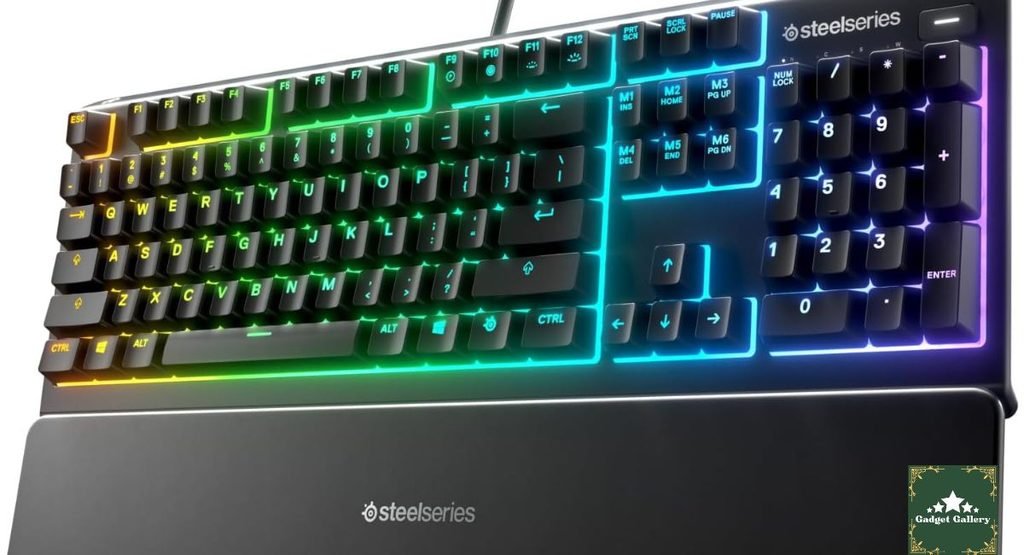
After two weeks of using my laptop keyboard to game (genuinely painful—do not recommend), I replaced it with the SteelSeries Apex 3. Partly because I wanted something water-resistant after the trauma. Partly because $55 felt like a safer investment in an apartment with a notoriously clumsy roommate.
Five months later, I have thoughts. And a different perspective on membrane gaming keyboards than I started with.
What I Expected vs. What I Actually Got
Let me be honest about my expectations going in. I had used mechanical keyboards for three years. I had opinions about membrane keyboards that were not flattering. Terms like “mushy,” “imprecise,” and “feels like typing on a sponge” were part of my vocabulary.
The Apex 3 changed some of those opinions. Not all of them—but enough to write a fair review instead of a dismissive one.
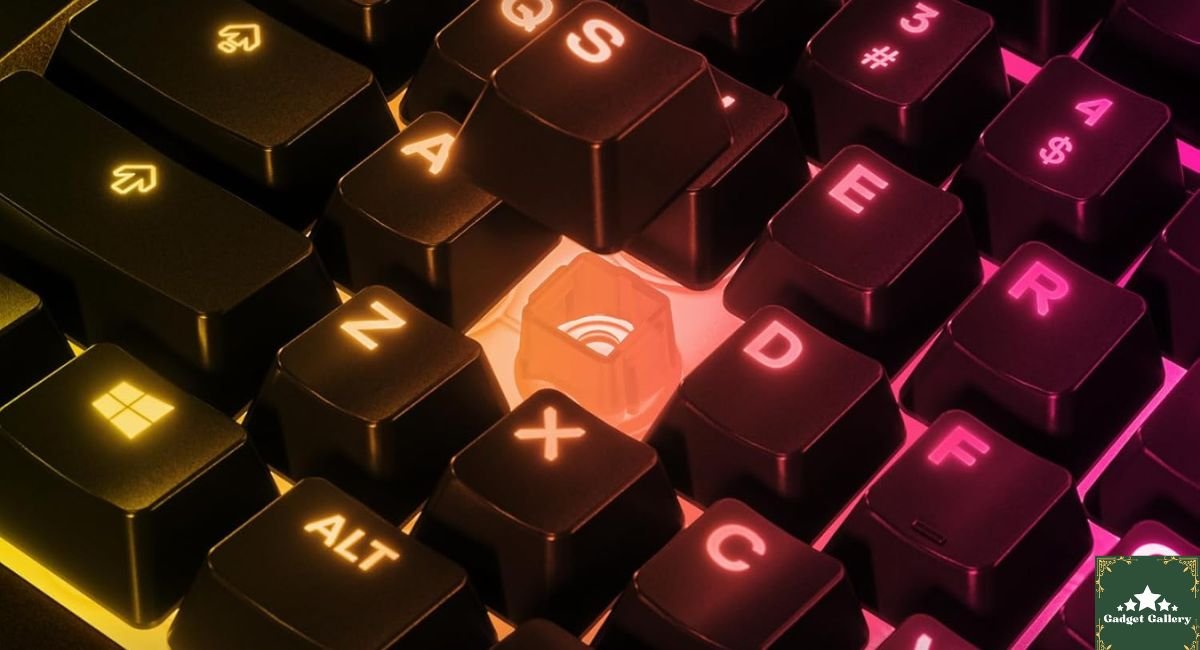
SteelSeries calls the switches “Whisper Quiet Gaming Switches.” That description is doing a lot of work, but it’s accurate. These are not clicky mechanical switches, not traditional rubber dome membrane switches, but a specific tactile membrane design that’s quieter than both while providing more feedback than a typical cheap membrane keyboard.
I was expecting to feel the mushiness I associated with membrane keyboards. I didn’t—not exactly. There’s genuine tactile response when a keypress registers, just without the audible click or the sharp mechanical snap. After two weeks of adjustment from mechanical, it felt different rather than worse. After a month, I stopped noticing the difference during actual gameplay.
The Water Resistance Test: Not the Way I Planned It
The IP32 rating was the feature that made me choose this keyboard over three alternatives I had shortlisted. IP32 means it’s rated against solid objects larger than 2.5 mm and protected against water dripping at a 15-degree angle—essentially, liquid spills from above.
Two months into ownership, the test happened again. This time it was my own fault—a glass of water caught by my headphone cable as I leaned back. About 200ml directly onto the center of the keyboard.
My immediate reaction: full panic mode. Then I remembered the IP32 rating.
I tilted the keyboard sideways immediately, let it drain for about 30 seconds over the trash can, wiped it down with a cloth, and continued the game.
Zero issues. Every key worked. No sticky keys, no dead zones, no erratic behavior from moisture in the PCB. The drainage ports on the keyboard’s underside did exactly what they were designed to do.
Important caveat I learned: IP32 is NOT submersion protection. It handles drips and light spills—not being dropped in a sink or in a monsoon. The rating means the keyboard drains and handles common desk accidents. It doesn’t mean you can clean it under running water (people try this, and it causes damage).
For a gaming keyboard that sits on a desk where drinks live, IP32 is meaningful real-world protection. It saved me $55 that day.
The 10-Zone RGB: SteelSeries Engine Makes This Actually Useful
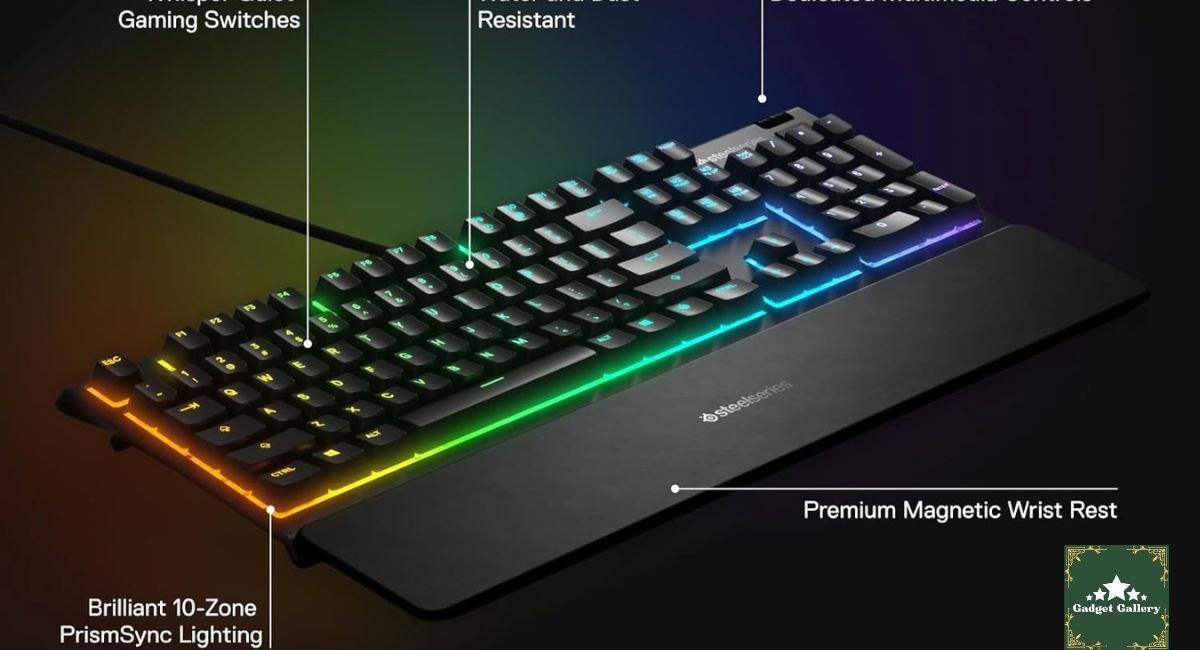
I’ll admit I initially thought “10-zone RGB” was marketing language for “some LEDs that change color.” After spending time with SteelSeries Engine, the companion software, I understand why the zone structure matters.
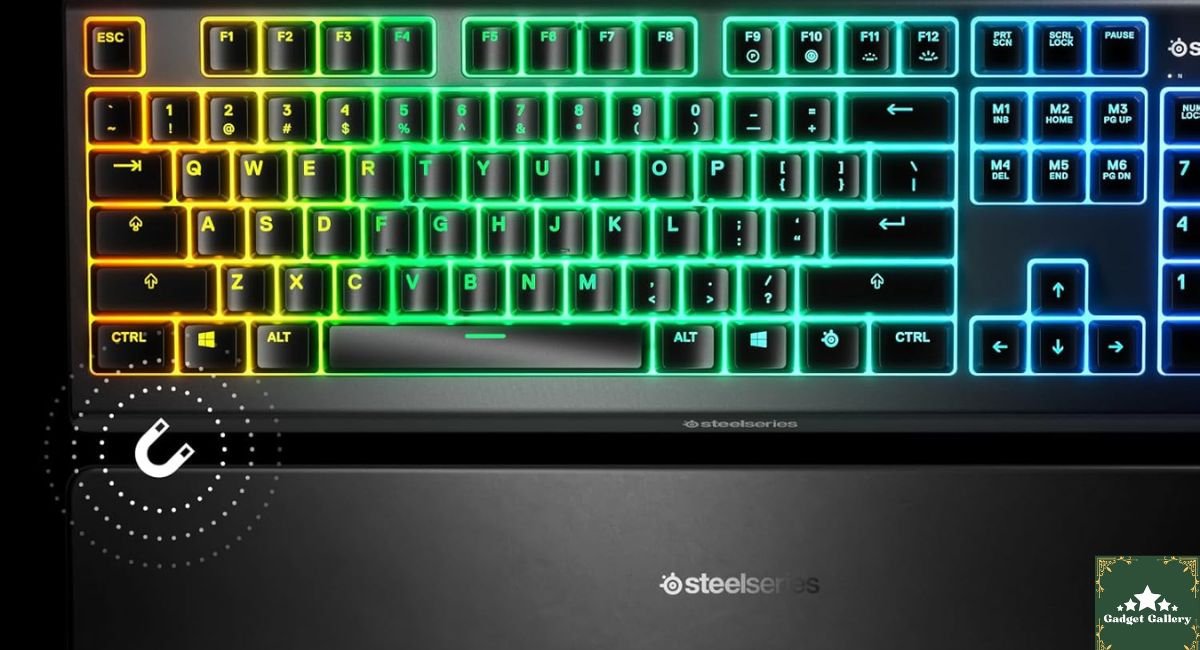
Ten independently controllable lighting zones means you can set up functional color coding, not just aesthetic patterns.
Here’s how I actually use mine:
Gaming profile setup:
- WASD keys: Bright blue
- Number keys 1-5 (ability hotkeys): Bright orange
- F keys used for macros: Red
- Everything else: Low-brightness white
The result is that in a dark room during a game, I can find my ability keys by the color without looking away from the screen. This sounds minor but becomes surprisingly natural after a few sessions.
SteelSeries Engine software: Free download, available for both Windows and Mac. Lets you create custom lighting profiles, set per-game configurations (the software detects which game is running and switches profiles automatically), and configure macro keys.
The software is more capable than I expected for a keyboard at this price. Creating a custom lighting zone pattern that changes based on in-game events (some games support this through SteelSeries integration — Rainbow Six Siege and Minecraft are confirmed examples) is legitimately impressive for the price tier.
One honest limitation: the per-key lighting that high-end mechanical keyboards offer (different color for every individual key) isn’t available here. Ten zones means ten areas, not individual keys. For pure aesthetic customization, high-end keyboards do more. For functional color-coding during gaming, ten zones is genuinely sufficient.
The Magnetic Wrist Rest: Unexpected Daily Value
When SteelSeries says “premium magnetic wrist rest,” I expected a marketing description for a foam pad with two weak magnets.
What I got was better than that.
The magnets are strong enough that you can lift the keyboard by the wrist rest once attached—I tested this out of curiosity. The connection is stable during actual use, including when I lean into it during long sessions and when I occasionally pull the keyboard toward me. It has never detached accidentally during five months of regular use.
The surface of the wrist rest is a soft synthetic material that’s noticeably more comfortable than the hard plastic edge of keyboards without one. After three- to four-hour gaming sessions, the wrist support reduces the strain that builds up when your wrists hang in extension over a hard edge.
The magnetic attachment means it stays where you put it rather than sliding independently. I’ve had non-magnetic clip-on wrist rests before that would drift away from the keyboard slowly during use. This doesn’t do that.
One thing to know: The wrist rest is designed specifically for this keyboard. It’s not a universal accessory. If you lose it or damage it, buying a universal keyboard wrist rest for $10-15 is still an option, but the magnetic alignment won’t be there.
The Whisper Quiet Switches: Five Months of Gaming
This deserves its own section because it’s the most controversial aspect of this keyboard among people comparing it to mechanical alternatives.
The Whisper Quiet Gaming Switches are SteelSeries’ proprietary membrane switch design. They’re quieter than any mechanical switch I’ve used. In testing during a Zoom call with my camera on, the person I was talking to could not hear typing. That’s genuinely impressive.
The actuation force and travel feel different from mechanical switches. There’s feedback when the key registers—a soft tactile bump—but no audible click and no sharp snap. The travel is about 4 mm, and the actuation is at 2 mm, which is in the standard range for gaming keyboards.
What I noticed for different use cases:
FPS gaming (Counter-Strike, Valorant): Movement keys felt responsive. WASD transitions during fast strafes registered cleanly without the feeling that I was fighting the keyboard. After the adaptation period, there was no meaningful performance difference from my mechanical keyboard in actual gameplay stats.
MOBA gaming (League of Legends): Ability spam is where quiet switches felt most natural. The lack of noise means no audible keyboard clatter during intense teamfights—surprisingly pleasant.
Typing long documents: This took the most adaptation. Extended typing sessions feel softer than mechanical, and I initially made more typos because the lack of audible feedback changed my typing rhythm. After about three weeks of regular use, this fully normalized.
For shared spaces: This is where the Apex 3 has an advantage no mechanical keyboard can match at any price. My roommate’s bedroom shares a wall with my desk setup. Gaming at midnight no longer causes friction. The keyboard is genuinely inaudible from the next room.
Build Quality: What Held Up and What Didn’t
Five months of daily use. Here’s the honest condition report:
What held up perfectly:
- Keycap lettering: No visible fade on any key, including the highest-use WASD and spacebar
- RGB function: All 10 zones still work correctly
- Magnetic wrist rest: Magnets still hold firmly, surface shows minimal wear
- USB cable: No fraying or connection issues
- Switch response: No stuck keys, no dead keys, no double-registering
What to show wear:
- The keyboard surface around the palm rest area shows faint hand oils that require occasional cleaning with a damp cloth
- The underside rubber feet are still intact but have reduced grip on my glass desk surface (this is a glass desk issue, not a keyboard issue—rubber on glass slides)
What I’d note as a potential long-term concern: The ABS plastic construction feels solid but not premium. It doesn’t flex during use, but heavy impacts or drops could crack it in a way that an aluminum-bodied keyboard wouldn’t. It’s built appropriately for the price—just worth knowing.
Overall for five months of gaming and two liquid incidents, productivity and durability are better than the price suggests.
Setting Up SteelSeries Engine: A Practical Walkthrough
A lot of reviews don’t cover the software side practically. Here’s what setting it up actually looks like:
Step 1: Download SteelSeries Engine from steelseries.com/engine—it’s free, and no account is required just for basic use.
Step 2: Install and open it. The Apex 3 is recognized automatically when connected.
Step 3: Go to Illumination to set up your lighting zones. Click each zone on the visual keyboard diagram and assign a color or effect.
Step 4: Go to the Keybindings section to set up any macro keys. The Apex 3’s function row can be reprogrammed for macros.
Step 5: Create a profile for each game. Name it, assign the executable file, and the software switches to that profile automatically when the game launches.
Step 6: If you want game-specific reactive lighting (in supported games), check the SteelSeries GameSense library for your game.
Total time for initial setup: about 20-25 minutes if you’re building multiple profiles. Worth doing on day one.
Mistakes I Made With This Keyboard
Mistake 1: Not cleaning the wrist rest regularly. Synthetic wrist rest materials absorb hand oils and sweat over time. The first three months I didn’t clean it at all. By month three it had a slightly tacky feel. A wipe with a damp cloth took 30 seconds and restored it completely. Clean it every two weeks.
Mistake 2: Trying to use the default lighting profile. The default profile is a rainbow wave that looks impressive in store but is functionally useless during gaming. Spend 20 minutes in SteelSeries Engine on day one and set up actual useful color zones. It changes the experience completely.
Mistake 3: Assuming the water resistance was more protection than it is. After the successful spill incident, I got overconfident. I knocked a full mug of tea onto it, and the cleanup required more care than the water incident—sugar from the tea got into the key mechanisms and made several keys sticky until I cleaned them out carefully. IP32 handles water, not sticky liquid. Keep actual beverages away from any keyboard, whether water-resistant or not.
Mistake 4: Not setting up GameSense in the supported games I played. I discovered GameSense (SteelSeries’ in-game lighting integration) three months in by accident. It’s available for free in Rainbow Six Siege, Minecraft, and other titles. The keyboard lighting reacts to in-game events—ammo count, health, etc. I had been gaming without it for months. Worth enabling immediately for supported games.
Who Should Buy the SteelSeries Apex 3
Buy this keyboard if you:
Are a casual to moderate gamer who wants a real gaming keyboard with RGB, good build quality, and reliable switches without spending $100+ on a mechanical keyboard. This hits the value sweet spot.
Live in a shared apartment or house where a loud mechanical keyboard would disturb others. The whisper-quiet switches are genuinely inaudible from another room—something no mechanical keyboard can offer.
Have experienced keyboard liquid damage (like me) and want meaningful protection for desk accidents. The IP32 rating with drainage ports is real and tested.
Want a proper wrist rest included without buying one separately. The magnetic attachment is better than aftermarket clip-on alternatives.
Are a streamer who types during streams and wants keyboard sound out of their audio mix without heavy noise gate processing.
Skip this and buy something else if you:
Love the tactile click feedback of mechanical switches, and it’s core to your typing or gaming experience. The Whisper Quiet switches are specifically designed to not click—this isn’t a preference; it’s an objective product characteristic.
Need per-key RGB lighting for detailed custom lighting setups. Ten zones is functional but not individual key control.
Type heavily for professional work as your primary use case. For a keyboard you use mostly for writing and productivity with occasional gaming, the Logitech Ergo K860 or a dedicated typing keyboard serves better.
Are you a competitive esports player needing the absolute fastest action speed? For tournament-level play, linear mechanical switches with the lowest actuation force still have a technical advantage.
Pros and Cons
Pros
IP32 water resistance with drainage ports—genuine protection against the spills that destroy most keyboards; tested and confirmed in real use
Whisper Quiet Gaming Switches—inaudible from another room; the best quiet switch in this price bracket
Premium magnetic wrist rest included—strong magnetic connection, comfortable surface material, no drift during use
10-zone RGB with SteelSeries Engine—functional zone color-coding for gaming setups; GameSense integration for supported titles
Excellent value at $55—build quality and feature set typically found at $80-100
Full-size layout with dedicated media keys—volume knob, media control buttons, and all standard keys present
USB pass-through for connecting a device directly through the keyboard
5-month durability confirmed—no keycap fade, no switch degradation, no structural issues
Cons
Membrane switches require adaptation from mechanical users—tactile feel is different enough that the first 2-3 weeks can feel frustrating.
No per-key RGB—10-zone control is functional but limits granular lighting customization.
ABS plastic body—durable but not premium; susceptible to visible cracking from heavy impacts unlike aluminum keyboards
Wrist rest absorbs oils—requires regular cleaning to maintain texture and appearance.
IP32 is not submersion protection—sticky liquids (juice, soda, coffee with sugar) still cause issues; it protects against water only.
No Bluetooth option—wired only; single USB-C or USB-A connection
FAQs
Q: Are the switches truly quiet enough for shared spaces? A: Yes. I’ve confirmed this through real testing—no sound audible from the adjacent room through a shared wall, and zero keyboard noise picked up during Zoom calls on my end. For apartment gaming without disturbing housemates, these are the quietest mainstream gaming switches available at this price.
Q: Does the IP32 water resistance hold up in real life? A: Based on two separate liquid incidents—a water glass and an energy drink—yes. The keyboard drained and continued working normally after both events. IP32 handles standard desk liquid accidents. Submersion, running water cleaning, or sticky liquid spills are a different matter.
Q: Is the SteelSeries Engine required for the keyboard to work? A: No. Without the SteelSeries Engine installed, the Apex 3 works with a default rainbow wave RGB lighting and standard key functions. SteelSeries Engine adds custom lighting profiles, macro configuration, GameSense integration, and per-game profile switching. It enhances the keyboard significantly but isn’t required for basic use.
Q: How does it compare to the Razer Ornata V3 at a similar price? A: Both are membrane keyboards in a similar price range. The Razer Ornata V3 uses “mecha-membrane” switches with a slight click compared to the Apex 3’s truly silent switches. The Apex 3 wins on water resistance (Razer doesn’t offer IP32 on the Ornata). The Ornata has better per-key RGB lighting. Choice depends on whether you want silent switches or better RGB granularity.
Q: Does the wrist rest work with other keyboards? A: The magnetic connection is designed specifically for the Apex 3. The magnets will attract to metal surfaces on other keyboards, but the alignment and fit are Apex 3 specific. It won’t work as a universal wrist rest for other keyboards.
Q: Is the full-size layout available, or is there a TKL version? A: SteelSeries offers the Apex 3 in a full-size layout and a Tenkeyless (TKL) version without the numpad. The TKL version is called the Apex 3 TKL and is available at a slightly lower price for users who want a smaller footprint on their desk.
Q: Can I remap any key on the keyboard? A: Via SteelSeries Engine, you can remap most keys, including the function row for macros. The core alphanumeric keys can be remapped for alternative layouts, though most users use the standard layout and customize the F-row.
Final Thoughts
Five months ago I bought this keyboard because I needed water resistance and had a $55 budget. Those were narrow criteria, and the Apex 3 was the obvious answer for them.
What I didn’t expect was to stop thinking about replacing it.
The mechanical keyboard I’m eventually going to buy when I want to upgrade is still theoretical. The Apex 3 keeps doing everything I need it to do without giving me a reason to change. That’s a different kind of recommendation than “this is the best keyboard I’ve ever used”—it”‘s “this keyboard has zero problems that make me want a different one.”
For $55, that’s the right kind of recommendation to give.
If you’re a gamer in a shared living situation, someone who’s experienced liquid damage before, or just someone who wants a capable gaming keyboard without overthinking the budget—the Apex 3 is a reliable, well-thought-out choice that will outlast whatever expectations you bring to it.
Where to Buy
🛒 Check Current SteelSeries Apex 3 Price on Amazon →
Related Reviews Worth Reading
- Logitech Ergo K860 Keyboard Review — Best ergonomic alternative if typing comfort is the priority
- Dell 27 Plus Monitor S2725HSM Review—Complete your gaming desk setup
- Ozeino Gaming Headset White Review — Budget gaming audio to pair with your keyboard
- CyberPowerPC Gamer Xtreme Review — Gaming PC to build around your new keyboard setup
- Xbox Wireless Gaming Controller Review — When you need a controller alongside your keyboard
👉 Subscribe to @5stargadgetgallery on YouTube—New gaming peripheral reviews and honest gear tests every week. Hit the notification bell!
🌐 Want to Build a Gaming Review Blog?
This site runs on Hostinger—the hosting platform I recommend for anyone starting a gaming or tech review blog from scratch.
- Plans start at $2.99/month
- Free domain for year one
- One-click WordPress installation
- Fast servers that handle image-heavy review content
- 24/7 live support
Start your gaming review blog with Hostinger.
Disclosure: This article contains Amazon Associates affiliate links. As an Amazon Associate, I earn from qualifying purchases at no additional cost to you. The SteelSeries Apex 3 was personally purchased and used for five months of daily gaming and productivity before writing this review. All findings are my own.