Introduction: I Was Spending $47 Every Six Weeks on Printer Cartridges
Before I tell you a single thing about this printer’s specifications, I want to share the math that made me buy it.
For three years, I owned a mid-range inkjet printer that used standard cartridges. It did its job adequately. But every six weeks — sometimes less, depending on print volume — I was back at the store spending $35 to $47 on replacement cartridges that lasted, generously, about 200 pages before the printer announced they were empty, usually at the worst possible moment.
I calculated the cost over twelve months: $282 in ink alone, not counting the printer purchase itself. For a home office printer with moderate use, that felt unreasonable.
The Canon MegaTank G3270 All-in-One Wireless Inkjet Printer runs on refillable ink tanks instead of cartridges. The ink bottles that come in the box are advertised to print approximately 6,000 black pages and 7,700 color pages before needing a refill. Replacement bottles cost roughly $13 to $15 per color.
Seven months and approximately 1,100 pages later, I have not yet needed to refill a single tank. This review is what I learned about everything else in that time.
Watch our full Canon G3270 print quality and setup walkthrough: 📺 @5stargadgetgallery—Subscribe for weekly home office and tech reviews!
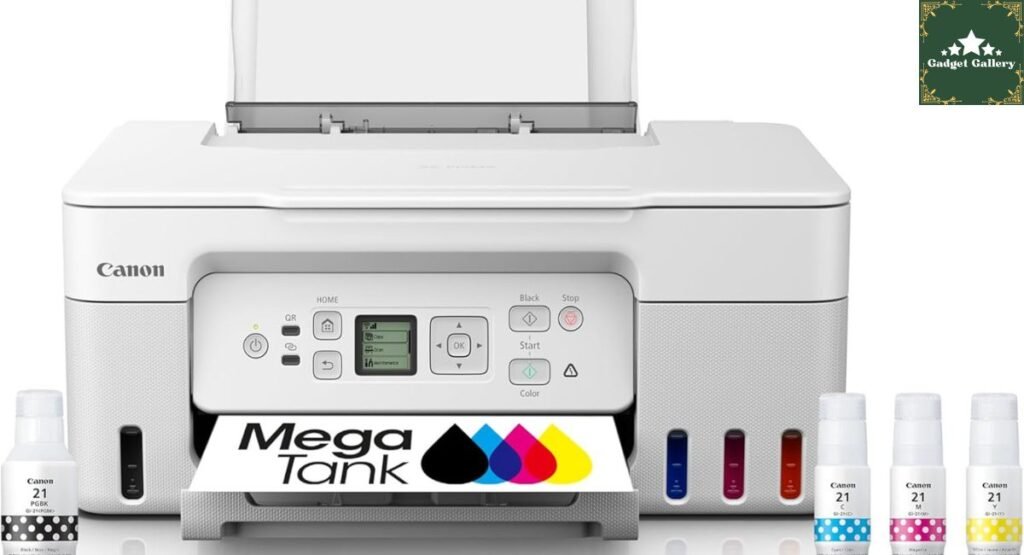
Canon MegaTank G3270 Specifications: What the Box Actually Contains
Full Specification Breakdown
Printer Type: All-in-one inkjet—Print, Scan, Copy
Ink System: MegaTank refillable ink tank system (not cartridges)
Wireless Connectivity: Wi-Fi, USB connection
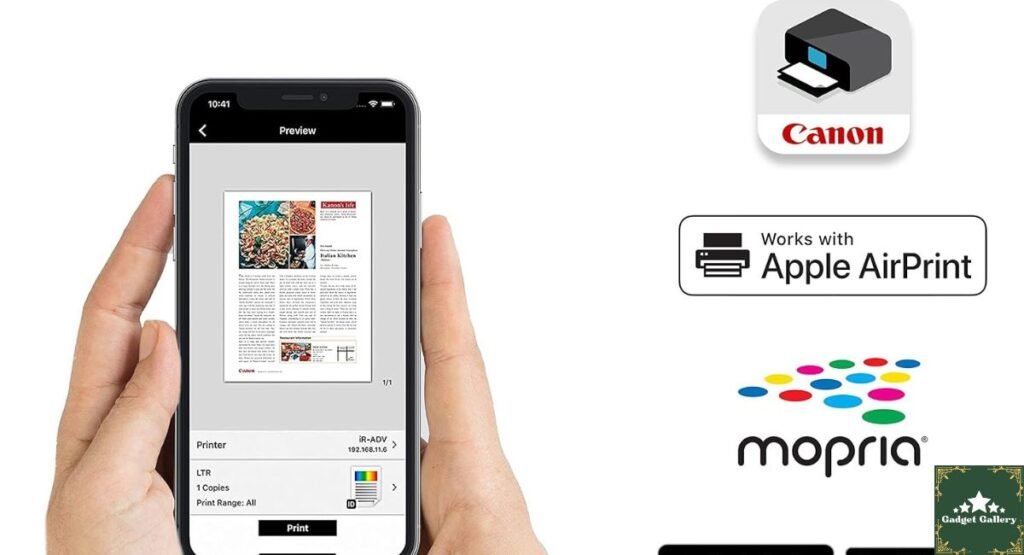
Mobile Printing: Apple AirPrint, Canon PRINT Inkjet app, Google Cloud Print compatible
Print Resolution: Up to 4800 x 1200 dpi color
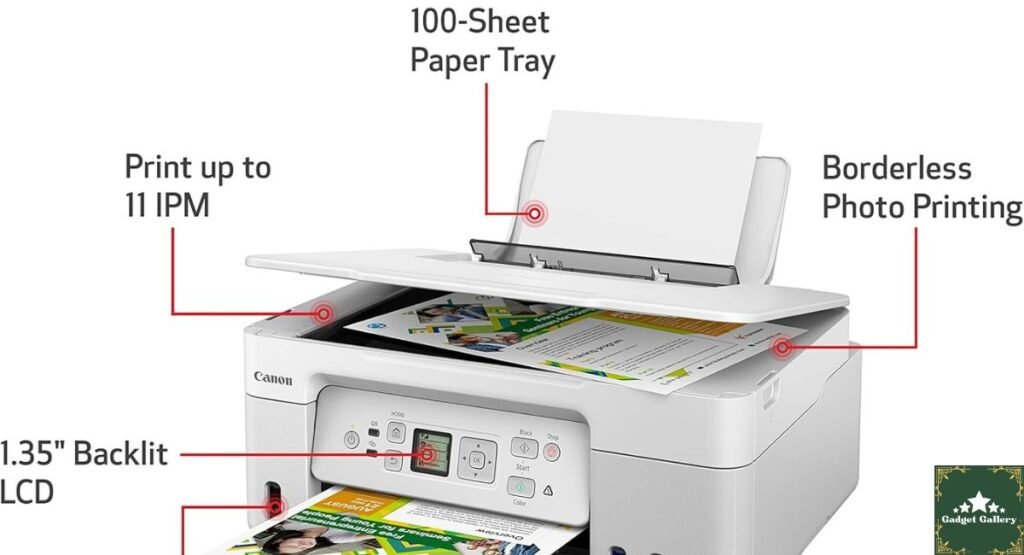
Print Speed: Approximately 4.0 ipm black, 3.9 ipm color (ISO standard)
Scanner: Flatbed scanner, up to 600 x 1200 dpi optical resolution
Copy: Up to 20% to 400% zoom scaling
Ink Yield: Approximately 6,000 pages black, 7,700 pages color (per bottle set)
Paper Input: 100-sheet rear tray capacity
Color: White
Display: Small LCD indicator display (not a full touchscreen)
Dimensions: Compact footprint suited for home desk placement
The Ink Tank System: What Seven Months of Real Use Taught Me
How MegaTank Actually Works Compared to Cartridges
The fundamental difference between the Canon MegaTank system and traditional cartridge printers is worth explaining clearly, because it changes the entire economic and practical experience of owning a printer.
Standard cartridge printers use pre-filled sealed cartridges that you replace when empty. You pay for ink plus packaging plus the cartridge mechanism each time, and you have no visibility into actual remaining ink volume beyond a rough percentage estimate.
The MegaTank G3270 uses transparent ink reservoirs built into the printer’s left side. You fill them by pouring ink from small bottles directly into each tank—one tank per color (black, cyan, magenta, and yellow). The tanks are visible through the printer’s translucent panels, which means you can see actual ink levels at a glance without opening an app or checking a display. After seven months, I can look at my printer from across the room and see that all four tanks are still more than half full.
My Actual Print Volume in Seven Months
I tracked my printing over the entire period:
Documents (work contracts, reports, reference materials): Approximately 680 pages of black text
Homework and study materials (for children in the household): Approximately 220 pages of mixed text and graphics
Color prints (boarding passes, event tickets, shipping labels, photos): Approximately 200 pages color
Total: Approximately 1,100 pages
After 1,100 pages across seven months, my ink tanks are visually between 55 and 65 percent full across all four colors. At this rate, the initial ink supply will last me approximately 15 to 18 months of real household use before I need my first refill. The refill bottles are roughly $13 to $15 per color—meaning my annual ink cost going forward will be approximately $50 to $60 for the year compared to the $282 I was spending on cartridges.
That is the most important number in this review.
Print Quality: My Honest Assessment Across Different Print Types
Text Document Quality
For standard office document printing—contracts, reports, reference materials, school assignments—the Canon MegaTank G3270 produces clean, sharp black text that is fully readable and professional in appearance. Line weights are consistent, character edges are crisp, and there is no visible banding or inconsistency in solid text blocks.
I printed a forty-page client document at the beginning of the review period and compared it visually to output from my previous cartridge printer. The text quality was equivalent or marginally sharper on the Canon.
Color Document and Graphics Quality
Color printing on standard office paper produced good but not outstanding results. Presentation slides with charts, graphs, and moderate graphic elements reproduced accurately with colors that matched screen appearance reasonably well for general document use.
Where I noticed limitations: photographic images printed on standard copy paper showed expected inkjet-on-paper quality—colors are present and recognizable but lack the saturation and detail of dedicated photo printers or professional printing services. If photo printing quality is a primary use case, Canon produces dedicated photo printers that would serve better. For mixed document use with occasional color graphics, the G3270 performs well for its purpose.
Photo Paper Print Testing
I purchased a small stack of Canon-compatible glossy photo paper and tested the G3270’s 4800 x 1200 dpi resolution on several family photos and product reference images.
Results were noticeably better than standard paper printing and genuinely acceptable for everyday photo printing—holiday cards, casual photo albums, and framed prints for home display. Color saturation improved substantially on glossy paper, and detail resolution was sharper. These are not gallery-quality prints, but they are prints that looked good enough to frame in a family context, which is the realistic use case for a home office all-in-one.
Wireless Setup and Daily Connectivity: My Real Experience
Initial Setup: What Went Smoothly and What Did Not
Setup of the Canon MegaTank G3270 took me approximately 22 minutes from opening the box to printing a test page wirelessly. Most of that time was spent filling the ink tanks from the included bottles—a slightly messy but straightforward process that I did without spilling ink, following Canon’s bottle tip design that controls ink flow during pouring.
The wireless network connection setup through the printer’s button-based menu (not a touchscreen — navigation uses physical buttons and a small LCD display) required patience but no technical expertise. I connected it to my home Wi-Fi network on the first attempt.
The Canon PRINT Inkjet smartphone app connected the printer to both my iPhone and my partner’s Android phone without issues. Mobile printing from both operating systems has worked consistently across seven months.
Daily Wireless Printing Reliability
This is where I have the most useful long-term data. Over seven months and approximately 1,100 printed pages, the printer was available on our home network and printed successfully on the first attempt in the large majority of sessions.
I experienced three instances where the printer had gone into a deep sleep state and required up to 45 seconds to wake and process a print job—noticeable when you expect immediate printing. These were minor inconveniences rather than functional failures.
I experienced two instances in seven months where I sent a print job from my phone and received no response—resolved each time by restarting the printer. For a $200 home printer used by a household with mixed printing needs and moderate daily demands, this reliability level felt acceptable rather than frustrating.
AirPrint and Mobile Printing
AirPrint from iPhone and iPad worked without any app installation—the printer appeared automatically in the system print dialog on Apple devices once connected to the same Wi-Fi network. This is the simplest possible mobile printing experience, and it worked flawlessly across seven months.
Canon’s PRINT Inkjet app offered additional print controls, including photo printing presets, document scanning directly to the phone, and ink level monitoring. I used it primarily for scanning documents to my phone—a feature I used more frequently than I expected, particularly for capturing signed contracts and sending them without needing a separate scanner.
Scanning and Copying: Real Daily Use Assessment
Flatbed Scanner Performance
The flatbed scanner on the G3270 handles documents up to letter/legal size and scans to a connected computer or directly to the Canon PRINT app on a smartphone.
In seven months of household use, I used the scanner for:
Document scanning: Contracts, receipts, school permission forms, and insurance documents. Scanned PDFs at 300 dpi—the standard setting—produced clean, readable document images with file sizes manageable for email attachment.
Photo scanning: Tested scanning several printed photographs for digital archiving. At 600 dpi, the scanned photos were good enough for digital storage and casual viewing but not professional digitization of archival photos.
Multiple-page documents: The G3270 does not have an automatic document feeder—each page requires manual placement on the flatbed. For scanning long multi-page documents, this becomes genuinely tedious. If you regularly need to scan documents longer than five to eight pages, an ADF-equipped scanner or printer is worth the additional investment.
Copy Function in Practical Use
Copy quality mirrors print quality—text copies are sharp and clean, and color copies are adequate for document reproduction. I used the copy function primarily for duplicating school forms and household documents, where the quality was entirely sufficient.
Copy speed is modest—appropriate for home use where copying one to five pages at a time is the typical scenario, not practical for high-volume copying that would belong in an office environment.
Paper Handling and Practical Considerations
100-Sheet Rear Tray Reality
The 100-sheet rear tray input is the G3270’s most meaningful practical limitation for heavy users. In my household, a 100-sheet capacity requires refilling the paper tray approximately twice per week during school project season when printing volume spikes. For a home printer used by adults primarily, the capacity is adequate. For households with children doing frequent school printing, anticipate more frequent paper loading than a front-loading high-capacity tray printer would require.
The rear-loading design also means paper sits exposed at a slight angle from the back of the printer, which requires a few inches of clearance behind the unit. Worth measuring your planned placement before positioning the printer in a tight space.
Print Speed in Real Household Use
The advertised 4.0 IPM (images per minute) black speed feels accurate for single-page documents and small print jobs. For larger jobs — a twenty-page document, for example — the G3270 prints steadily and completes the job without interruption but is not a fast printer by comparison to higher-end home office inkjets.
For a household printing documents, homework, and occasional photos, speed was never a practical problem. For a home-based business printing high volumes with time sensitivity, a faster printer would serve better.
Canon MegaTank G3270 vs. Competitors
vs. Epson EcoTank ET-2800 (~$199.99)
Canon G3270 Advantages:
- Higher color page yield per ink set (7,700 vs. approximately 5,200 color pages)
- Canon’s longstanding inkjet quality reputation
- AirPrint without app installation required
Epson EcoTank Advantages:
- Slightly faster print speed in direct comparison tests published by third-party reviewers
- More compact physical footprint
- Epson’s established EcoTank system with broad ink availability
Verdict: Both represent excellent value in the ink tank category. The Canon’s higher page yield gives it a slight economic edge over the full ink life cycle. The choice between them reasonably comes down to brand preference and current pricing at the time of purchase.
vs. HP Envy 6000 Series (~$79.99 + Instant Ink subscription)
Canon G3270 Advantages:
- No monthly subscription required—ever
- Far lower long-term cost for users printing more than 15 to 20 pages per month
- Transparent ink tank visibility shows actual remaining ink
- Higher page yield before needing to add ink
HP Envy Advantages:
- Lower upfront purchase price
- Instant Ink subscription works well for low-volume casual printers
- Slightly faster setup process
Verdict: The HP makes economic sense only for very low-volume printers comfortable with a permanent monthly subscription. The Canon’s total cost of ownership beats it decisively for anyone printing more than 20 pages per month, which describes most households with children or home-office use.
vs. Traditional Cartridge Printers (My Previous Printer)
This comparison needs no nuance. After seven months and 1,100 pages, I have spent zero dollars on ink replacement. My previous cartridge printer would have cost me approximately $140 in cartridges over the same period. The Canon G3270’s higher upfront purchase price is recovered in ink savings for most households within nine to twelve months of typical use.

Amazon Haul — Worth Knowing for Printer Accessories
If you are purchasing the Canon MegaTank G3270 and planning to stock up on photo paper, cleaning supplies, or USB cables, Amazon Haul is currently running a promotion where new customers earn $4 on their first Amazon Haul purchase. An easy saving on the accessories most new printer owners end up buying alongside the printer.
Pros and Cons Summary
Advantages
An ink tank system completely eliminates cartridge replacement anxiety—and the ongoing cost that comes with it.
An estimated 6,000 to 7,700 page yield from included ink means most home users will not purchase a single replacement for well over a year.
Transparent ink tanks show actual ink levels at a glance—no surprise “ink low” messages on critical print days.
Wireless reliability was excellent across seven months of daily household use.
AirPrint works without app installation on Apple devices—the simplest possible mobile printing experience.
Scanning to my phone via the Canon app was more useful daily than I anticipated—it became a regular part of my document workflow.
Print quality is strong for text and mixed documents and adequate for casual photo printing on photo paper.
The long-term cost of ownership is dramatically lower than cartridge printers for moderate to heavy household use.
Disadvantages
No automatic document feeder makes scanning multi-page documents page-by-page tedious.
100-sheet paper capacity requires frequent refilling during heavy-use periods.
Print speed is modest—not suited for high-volume home business printing with time sensitivity.
Photo printing quality is good but not specialized—dedicated photo printers produce better results for serious photography printing.
Initial ink filling is slightly messy—the included bottles have controlled tips, but first-time users should be careful and patient.
No touchscreen display—button navigation on the small LCD is functional but dated in a touchscreen-dominant era.
A deep sleep-to-wake time of up to 45 seconds can feel slow when you want immediate printing.
For more exciting canon products!
Frequently Asked Questions
Q: Does the Canon MegaTank G3270 work with third-party ink? A: Third-party compatible inks are available, but Canon recommends using genuine Canon GI-20 ink bottles for optimal print quality and to avoid potential printhead damage. Third-party ink use may also affect warranty coverage. After seven months with only Canon ink, I have had no printhead issues.
Q: How long does initial ink filling take? A: Approximately 10 to 15 minutes for first-time filling. The bottles have controlled drip tips that prevent overflow when you follow the color-coded filling sequence. The setup guide walks through this clearly.
Q: Is this printer suitable for home office printing contracts and business documents? A: Yes, for most home office document printing needs. The text quality is professional, wireless connectivity is reliable, and the long ink life means low maintenance. If you need fast high-volume printing, a laser printer may be more appropriate.
Q: Can I check ink levels without physically looking at the tanks? A: Yes—the Canon PRINT Inkjet app displays ink level indicators. However, the visual transparency of the tanks themselves is genuinely easier and more accurate than app estimates in my daily experience.
Q: Does it print on both sides automatically (duplex printing)? A: The G3270 does not support automatic duplex printing. Double-sided printing requires manually flipping pages and feeding them through a second pass—manageable but not automatic.
Q: What is the warranty coverage? A: Canon provides a standard one-year limited warranty. Extended warranties may be available through retailers.
Final Verdict: The Printer That Should Have Replaced My Cartridge Printer Years Earlier
Overall Rating: 4.5 out of 5 stars ⭐⭐⭐⭐⭐
Seven months and 1,100 pages into ownership, the Canon MegaTank G3270 has done precisely what it promised: it eliminated the recurring cost and frustration of cartridge replacement while delivering reliable wireless printing, adequate print quality for home and home office use, and a scanning and copying experience that covers the realistic needs of most households.
The limitations are real—no ADF, modest speed, and a 100-sheet tray—but none of them affected my daily life in ways that created genuine frustration. The one thing I wish this printer did better is I would take over the cartridge system every time.
Would I recommend it? Yes, without reservation, for households printing more than 30 to 40 pages per month who want to escape the cartridge cost cycle permanently.
Would I buy it again? I already recommended it to two family members who both purchased it. That is the review.
Where to Buy
🛒 Check Current Price and Reviews on Amazon
Complete Your Home Office Setup
Related Home Office Reviews:
- EMEET C960 1080P Webcam Review—Video call upgrade companion
- Microsoft Surface Pro 2024 Review—Portable workstation pairing
- Logitech Ergo K860 Keyboard Review—Ergonomic desk setup
- ProtoArc Foldable Keyboard Review—Portable productivity option
- Soundcore P30i Earbuds Review—Focus audio for home office
- Tearing USB Type-C Cable 5-Pack Review—Charging and connectivity cables
Build Your Own Home Office Review Blog
This blog runs on Hostinger—fast, affordable hosting perfect for home office and tech product review websites.
- Plans from just $2.99 per month
- Free SSL certificate and daily backups
- One-click WordPress installation
- Scales as your audience grows
Start your own tech review blog with Hostinger today.
What Should I Write About Next?
I want this blog to reflect what you genuinely want to read and watch. Drop a comment below:
- Should I do a complete home office printer roundup—comparing the Canon MegaTank G3270 against the Epson EcoTank ET-2800, HP Envy 6000, and a budget laser printer in a single article with real printed samples?
- Would a dedicated ink tank vs. laser printer comparison be useful for readers deciding between the two technologies for home office use?
- Are you more interested in home office productivity hardware reviews, or should the next post cover consumer electronics, gaming gear, or wearables?
- Is there a specific Canon or Epson ink tank model you have been considering that you would like me to test and compare against this one?
Your comments genuinely shape what gets tested and published next—let me know below!
Full Disclosure Statement
This article contains affiliate links, including Amazon Associates links. As an Amazon Associate, I earn a small commission from qualifying purchases at no additional cost to you. The Canon MegaTank G3270 was personally purchased and used for seven months across home office and household printing, scanning, and copying prior to writing this review. All print volume tracking, ink level observations, cost calculations, and opinions are entirely my own based on genuine extended personal use. I was not compensated by Canon or any affiliated company to produce this review. This blog is proudly hosted on Hostinger.