
There is a specific kind of embarrassment that happens when someone sits down at your desk.
Not the paperwork embarrassment. Not the monitor-with-too-many-tabs embarrassment. The crumb embarrassment. That moment when a visitor glances down at your keyboard and you can visually watch them clock the months of accumulated debris between your keys—the remnants of lunches eaten at the desk, snacks during video calls, and whatever that gray powder is that accumulates on every surface that stays still long enough.
I had been using compressed air cans to deal with this for two years. The problem with compressed air cans is that they move the debris rather than removing it. You blast air into the keyboard, the crumbs shoot out from between the keys, and then they’re on your desk. You sweep the desk, and they go on the floor. The mess relocates rather than disappears.
A colleague two desks over produced a small white object one afternoon, ran it across his keyboard for about thirty seconds, and the crumbs were simply gone. Not relocated. Gone.
That was the ODISTAR Mini Desktop Vacuum Cleaner. I bought one that evening for under $10. Five months later, it’s one of the genuinely useful small purchases I’ve made for my desk setup.
What This Thing Actually Is
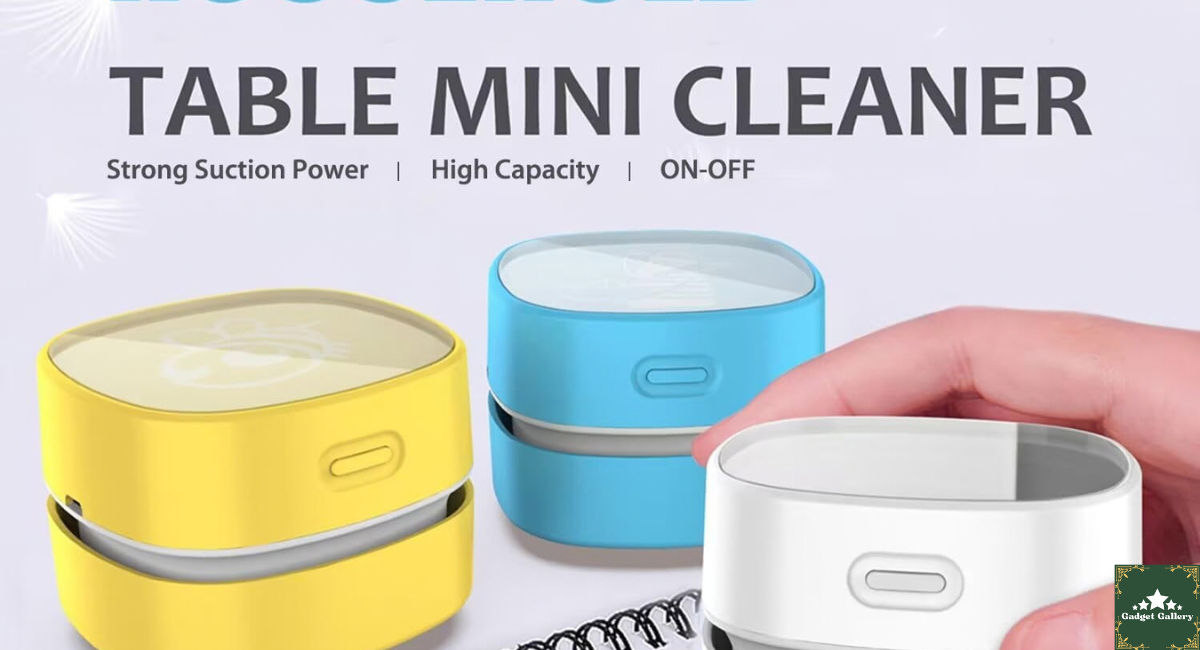
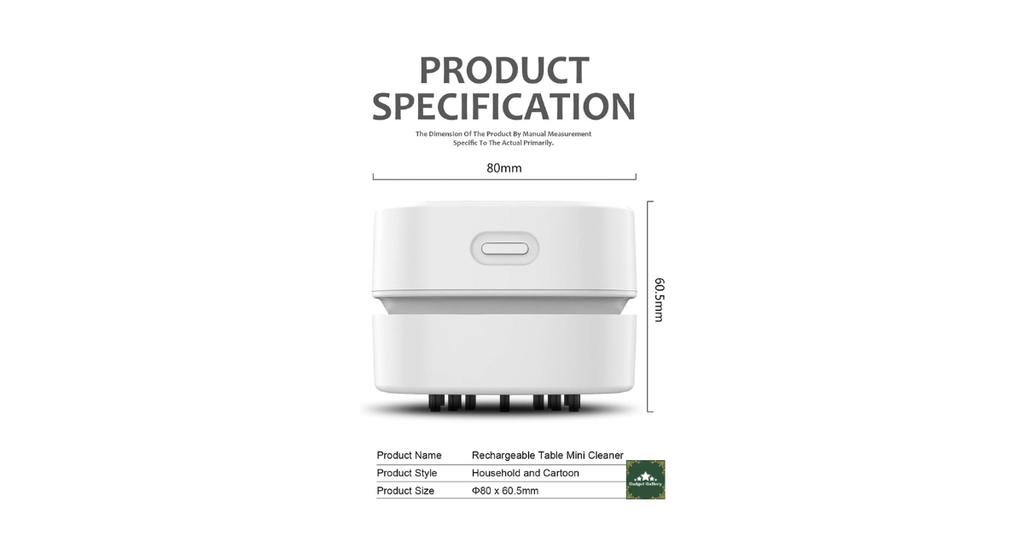
The ODISTAR Mini Desktop Vacuum is exactly what it looks like—a miniature vacuum cleaner designed for desk surfaces, keyboards, and small areas. It’s about the size of a large eraser or a stubby permanent marker. White plastic body, small suction nozzle at one end, a small collection compartment inside for what it picks up.
Power comes from two AA batteries—included in some versions, not in others depending on the listing. The AA battery design is intentional: no charging cable, no USB dependency, and no battery status app to check. Drop in batteries; pick them up whenever you need them.
What’s in the box:
- ODISTAR mini vacuum unit
- Small cleaning brush attachment (fits over the nozzle for gentler surface work)
- AA batteries in some versions
- Basic instruction card
The first time you turn it on, the suction is more surprising than the size suggests. This is not the vacuum equivalent of blowing air through a straw. It creates actual suction that picks up visible debris effectively.
Five Months of Daily Desk Use: What Actually Happened
My desk situation: a keyboard that I type on extensively for work and content writing, a mousepad that collects dust visibly within days, a desk surface around my monitor that accumulates fine particles, and a habit of eating lunch at the desk that I’m not proud of but also not planning to change.
Here is what five months of regular ODISTAR use revealed across different cleaning scenarios:
Keyboard Cleaning
This is the primary use case and where the ODISTAR performs best.
Running the nozzle along the gaps between keys picks up fine dust, hair, and small debris cleanly. The suction is strong enough for loose particles and fine dust but not powerful enough to dislodge keycaps or interfere with keyboard mechanics—an important distinction when cleaning expensive mechanical keyboards.
For larger crumbs lodged firmly between keys, the vacuum handles them if they’re loose. For crumbs that have been there long enough to compress between keys, you may need a toothpick or similar to dislodge them first, then vacuum. This is not a failure of the vacuum—it’s the physics of debris that has compacted into small spaces over time.
I clean my keyboard with this once per week. The cleaning process takes about two minutes. Before the ODISTAR, my keyboard cleaning happened approximately never, because compressed air just moved the problem.
Desk Surface Around the Keyboard
Fine dust on flat surfaces is where the ODISTAR is honestly less efficient than a slightly damp microfiber cloth. The vacuum handles visible particles and light dust effectively. For the invisible-to-eye fine dust film that accumulates on surfaces, a cloth is faster.
Where the vacuum wins on flat surfaces: corners, edges, and areas around equipment where a cloth can’t reach without moving everything. The narrow nozzle gets into the gap between my keyboard and monitor without disturbing either.
Around Food Debris (The Lunch Problem)
Within 30 seconds of finishing eating at my desk, I now run the ODISTAR over the surface. Salt from snacks, crumbs from sandwiches, whatever else was involved—picked up immediately before it has a chance to become embedded or knocked onto the floor.
This particular habit changed my desk situation more than anything else. Dealing with debris immediately rather than waiting for a cleaning session prevented accumulation entirely. The ODISTAR being instant-access on my desk (no setup, no finding compressed air cans, no battery charging) made the immediate use habit sustainable.
Mouse and Mousepad
The mousepad surface picks up fine debris and hair that affects mouse tracking over time. Running the ODISTAR across the mousepad surface removes the loose particles without damaging the surface material.
The mouse itself—particularly the feet on the bottom that can accumulate debris and affect glide—was cleaned well with the brush attachment rather than the direct nozzle. The brush creates gentler suction appropriate for sensitive surfaces.
The AA Battery Design: Why It’s Both Good and Limiting
AA batteries as a power source is a deliberate design choice that has genuine daily advantages and one real limitation.
The advantages:
No charging ritual. The vacuum is always ready because there’s no battery state to manage. Pick it up, turn it on, use it, and put it back. No USB cable, no dock, no checking whether it charged overnight.
No proprietary charger to lose. Batteries are available everywhere. If they die during a cleaning session, replacement takes 30 seconds with batteries from any drawer, convenience store, or corner shop anywhere in the world.
No degrading battery over charge cycles. Lithium-ion rechargeable batteries lose capacity over charge cycles—after 2-3 years of regular charging, a built-in battery produces less runtime than when new. AA batteries provide consistent performance until depleted, then full performance again with fresh batteries. The vacuum will work identically in five years as it does today.
The limitation:
Ongoing battery cost and waste. Regular use means regularly replacing batteries. Over a year of weekly use, that adds up in both cost and environmental footprint.
I use rechargeable AA batteries (Eneloop brand, which I also use for other devices) to address the cost and environmental aspect. This turns the AA design into an advantage—I charge a set of AA batteries periodically and swap them in across all my AA devices. For users who don’t already use rechargeable AAs, the running cost is worth factoring in.
How to Use It Effectively: Practical Tips From Five Months
The ODISTAR is simple enough that instructions feel slightly unnecessary, but a few things I learned through use are worth sharing.
Start at the far side and work toward yourself. When cleaning a keyboard, begin at the top row and work downward toward you. This way debris that the vacuum doesn’t capture on the first pass falls into territory you haven’t cleaned yet rather than onto already-cleaned areas.
Empty the collection compartment before it’s full, not after. The tiny collection chamber fills faster than you’d expect during a thorough first clean. Suction degrades noticeably when the chamber is full. Tip it out into the trash halfway through a deep clean rather than pushing through with reduced performance.
Use the brush attachment for sensitive surfaces. The direct nozzle has the strongest suction and is appropriate for keyboards and hard surfaces. For mousepads, speaker grilles, monitor bezels, and any surface with fabric or fine material, the brush attachment diffuses the suction appropriately and prevents surface damage.
Slow and deliberate beats fast and random. Moving the nozzle slowly over key gaps gives the suction time to draw particles up. Moving quickly over the surface reduces contact time and picks up less. Think of it like a small floor vacuum—it works better when you let it stay in one spot long enough to work.
Clean it after every use. Tap the collection compartment into a bin after each cleaning session. A few seconds of maintenance after each use means the vacuum is always ready for the next one without the suction degradation that comes from a full chamber.
Unexpected Results I Didn’t Anticipate
It changed my cleaning habits more than my desk cleanliness directly. What I didn’t predict was that having the ODISTAR accessible on my desk changed when I cleaned rather than just how. The friction of getting out compressed air cans or a handheld vacuum from a drawer meant cleaning happened infrequently. The ODISTAR being permanently on the desk meant cleaning happened immediately after each use of the desk. The habit change is the bigger improvement, not just the tool.
It works on car interiors surprisingly well. I threw it in my bag for a road trip and used it to clean the car’s cupholders and door pockets. The battery-powered design meant it worked perfectly away from any outlet. For car interior detail work in tight spaces, it’s genuinely useful beyond the desk application.
The suction is louder than expected for the size. The noise level is similar to a small handheld vacuum—audible across a room. For office environments, this means choosing when to use it rather than running it during calls or in quiet shared spaces. I use mine before my first video call of the day and during lunch breaks. The noise is not disruptive if you plan around it.
The white color shows age faster than I expected. The white plastic body shows yellowing at stress points (around the nozzle and buttons) after several months of regular handling. Functionally unchanged—purely cosmetic—but worth noting that the white color looks less pristine over time than it did in the product photos.
Mistakes I Made
Mistake 1: Using it on a full collection chamber. First deep clean of my keyboard produced so much debris that the chamber was full within the first minute. I didn’t notice and continued for another three minutes wondering why suction seemed weaker. Empty the chamber more frequently than you think necessary, especially on the first cleaning after a long neglect period.
Mistake 2: Using the direct nozzle on my fabric mousepad. The strong direct suction slightly pulled at the surface fibers of my cloth mousepad. No lasting damage but it felt wrong. Switched to the brush attachment for the mousepad and haven’t had the issue since. Soft or fabric surfaces need the brush.
Mistake 3: Expecting it to handle wet debris. I knocked a small amount of liquid near the keyboard once and instinctively reached for the ODISTAR. This is a dry-only vacuum — attempting to suction liquid would damage the unit and potentially create electrical hazards. Dry cloth for any liquid, always.
Mistake 4: Storing it in a drawer. For the first two weeks I kept it in my desk drawer. I used it twice. When I put it on my desk next to the keyboard organizer, I started using it after every meal at the desk. Accessibility determines habit formation.
Who Should Buy the ODISTAR Mini Desktop Vacuum
Buy this without hesitation if you:
Eat at your desk regularly and accumulate food debris that affects the cleanliness and functionality of your keyboard and workspace.
Work in an office or shared space where a full-size vacuum would be impractical and compressed air cans create the annoying problem of moving debris rather than removing it.
Want a simple, always-ready desk cleaning tool that requires no charging, no setup, and no preparation—just pick up and use.
Are a content creator or photographer whose desk setup appears in videos or photos and who wants to maintain a clean visible workspace without involved cleaning sessions.
Have mechanical keyboards with visible between-key gaps that accumulate debris visibly and need regular maintenance.
Are buying a practical gift for a desk worker—this is the kind of thing people don’t buy themselves but immediately appreciate when they have it.
Skip this if you:
Need to clean large surface areas regularly—the small chamber capacity and battery-powered motor aren’t suited for extended cleaning sessions of significant surface areas. A regular handheld vacuum serves this better.
Want rechargeable wireless convenience as a standard—if USB-C rechargeable is important to your workflow, this specific vacuum requires AA batteries. Alternatives with USB-C charging exist at slightly higher prices.
Have deep cleaning needs—the ODISTAR handles light maintenance and regular surface cleaning, not embedded grime or heavy soiling that requires stronger suction and cleaning solutions.
Pros and Cons
Pros
Immediate, no-setup operation—AA batteries mean it’s always ready with no charging ritual.
Compact size fits anywhere on a desk—small enough to keep permanently accessible without taking meaningful desk space.
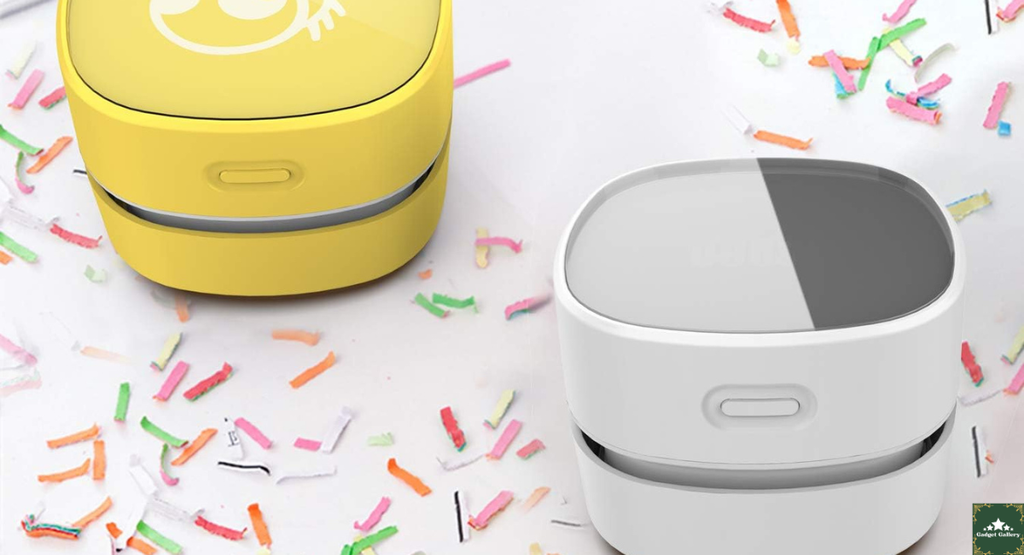
Effective suction for the size—noticeably stronger than expected and genuinely removes debris rather than relocating it
Brush attachment protects sensitive surfaces—the included accessory enables appropriate use on fabric and delicate materials.
Battery-powered for full portability—works anywhere, including cars, travel, and areas without power access.
Low price makes the purchase low-risk—under $10 price point removes the financial hesitation from the buying decision.
Consistent performance—no battery degradation over time if using replaceable AAs
Habit-forming by being accessible—keeping it on the desk rather than stored creates cleaning habits that improve the overall desk situation.
Cons
Ongoing battery cost—regular use means regular battery replacement; rechargeable AAs are recommended to manage this.
Small collection chamber fills quickly—needs frequent emptying during thorough initial cleaning sessions.
Dry use only—not suitable for liquid debris; attempting liquid suction can damage the unit.
Audible noise level—more sound than some users expect for the size; not suitable for use during calls or in quiet shared spaces
White plastic shows yellowing at stress points—cosmetic aging around the nozzle and controls after several months of handling.
Limited to light maintenance—not a replacement for thorough deep cleaning with proper equipment; best for regular light maintenance
FAQs
Q: Does this work for keyboard cleaning specifically? A: Yes—keyboard cleaning is the primary designed use case and where it performs best. The nozzle width is appropriate for running along key gaps, and the suction handles loose debris between keys effectively.
Q: What size AA batteries does it use, and are they included? A: Standard AA batteries (available everywhere). Inclusion varies by listing version—check your specific purchase. Having a set of AA batteries ready before it arrives saves a potential delay.
Q: Can I use this on a mechanical keyboard without damaging it? A: Yes. The suction is appropriate for loose debris between keys but not strong enough to dislodge keycaps or affect switch mechanics in standard use. For keyboards with keycaps you’re concerned about, use the brush attachment rather than direct nozzle contact.
Q: Is it loud enough to bother people in an office? A: The noise level is similar to a small handheld vacuum—audible across a typical office. Using it during calls or in silent shared spaces would be noticeable. Plan use during breaks or before/after call schedules.
Q: How do I empty the collection compartment? A: The collection compartment typically opens by twisting or pulling off the nozzle end—specific mechanisms vary by version but are designed to be accessible without tools. Tap the contents into a bin and reassemble.
Q: Can I use this on fabric surfaces like a mousepad or chair? A: Use the brush attachment rather than the direct nozzle for fabric surfaces. Direct nozzle suction can pull at fabric fibers. The brush diffuses suction appropriately for softer materials.
Q: How long do the batteries last? A: Battery life depends on use frequency and session length. For once-weekly 2-3 minute cleaning sessions, a set of AA batteries typically lasts 2-4 months. For daily use, more frequent replacement. Rechargeable AA batteries (Eneloop or similar) are the practical long-term solution.
Final Thoughts
Five months after buying this because a colleague demonstrated it at his desk, the ODISTAR mini vacuum has done something I didn’t predict: it made me a more consistent desk cleaner without any additional effort or discipline.
The mechanism is simple—when something is immediately accessible on your desk and takes no setup, you use it after each meal and before each work session. When it’s in a drawer or requires finding a compressed air can, you don’t. The ODISTAR being on my desk turned desk cleaning from an occasional event into a two-minute daily habit.
The product is what it is: a small, effective, battery-powered vacuum for light desk maintenance that works better than anything else at this price point for its specific purpose. It’s not a deep cleaning tool. It’s not going to replace a proper vacuum for serious jobs. It’s an always-ready desk accessory that handles the daily debris reality of a work-from-home or office desk, and it does that job reliably for under $10.
If your keyboard is a crime scene and compressed air cans have been your only recourse, this is the practical solution that actually removes the evidence instead of scattering it.
Where to Buy
🛒 Check Current ODISTAR Mini Vacuum Price on Amazon →
Related Reviews Worth Reading
- SteelSeries Apex 3 RGB Gaming Keyboard Review—The keyboard you’ll want to keep clean with this vacuum
- Amazon Basics PC Speakers Review—Another practical desk upgrade at an honest price
- Logitech Ergo K860 Keyboard Review — Premium keyboard worth maintaining properly
- Dell 27 Plus Monitor S2725HSM Review—Complete your clean desk setup
- Redragon S101M-KS Wireless Keyboard Mouse Review — Wireless setup that still needs regular cleaning
👉 Subscribe to @5stargadgetgallery on YouTube—Weekly honest desk accessory and gadget reviews. Subscribe and hit the notification bell!
🌐 Start Your Own Desk Setup Review Blog
This site runs on Hostinger—the hosting platform I use—because it makes maintaining a review site manageable without technical overhead.
- Plans start at $2.99/month
- Free domain for year one
- One-click WordPress installation
- Fast servers for image-heavy desk setup content
Launch your desk setup review blog with Hostinger
Disclosure: This article contains Amazon Associates affiliate links. As an Amazon Associate, I earn from qualifying purchases at no additional cost to you. The ODISTAR Mini Desktop Vacuum was personally purchased and used for five months of daily desk maintenance before writing this review. All findings are entirely my own.