For three years I had been doing something I’m slightly embarrassed to admit now.
I was using a laptop for all my work-from-home sessions, video calls, music, and YouTube—and tolerating the built-in speakers because getting separate speakers felt like one more thing to buy, one more cable to manage, and one more decision to make.
The built-in speakers on my 14-inch laptop were not terrible. They were worse than that—they were just fine enough that I kept finding reasons not to upgrade them. “The audio is okay for calls.” “I mostly use headphones anyway.” “It’s not worth spending money on.”
Then I started reviewing products more seriously and realized that for my video call setup to sound right on the other end, I needed to hear my recorded audio clearly during playback. My laptop speakers were giving me a false impression of what my recordings actually sounded like. I was editing audio that I thought was fine because I was listening through speakers that hid its problems.
I bought the Amazon Basics PC Speakers for $17 specifically because I didn’t want to think about it. I needed something better than laptop speakers, I didn’t want to spend a lot, and Amazon’s own brand felt like a safe experiment.
Eight months later, they’re still on my desk. Here’s the complete, honest picture.
What You Actually Get: No Surprises
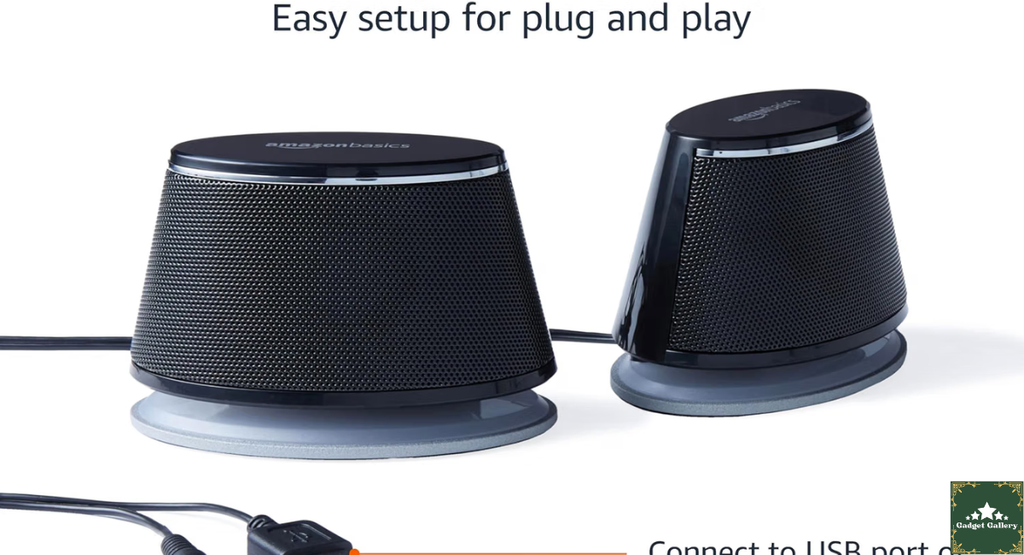
The Amazon Basics Stereo 2.0 Speakers are exactly as described and no more. Two satellite speakers—left and right—are connected by a fixed cable. One speaker has the volume control knob mounted on its front face. Power comes from a USB-A cable (plugs into any USB port on your computer). Audio input is via a 3.5 mm aux cable, the standard headphone jack connector.
Contents of the box:
- Left and right speaker units
- Fixed cable connecting them
- USB-A power cable (attached)
- 3.5mm audio cable (attached)
- No separate remote, no app, no software
Setup takes approximately 90 seconds:
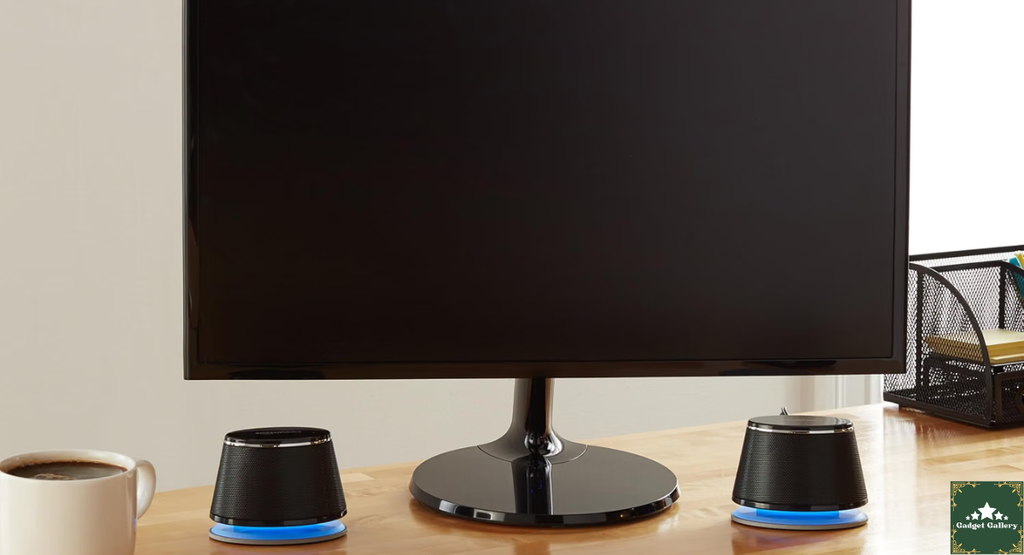
- Place the left and right speakers on either side of your monitor
- Plug the USB-A cable into any available USB port on your computer
- Plug the 3.5 mm cable into your computer’s headphone/audio output jack
- Turn the volume knob on the right speaker
- Audio plays
That is genuinely the entire setup. No Bluetooth pairing. No driver installation. No audio device configuration in Windows or macOS. Your computer sees the 3.5mm connection as a standard audio output and routes sound to the speakers automatically.
The first time I plugged them in and audio started playing in under two minutes from opening the box, I understood why some people never buy more complicated audio setups.
Eight Months of Daily Use: Real Observations
My desk setup has these speakers positioned about 24 inches apart, roughly 18 inches from my seated position. That’s a close-range desk listening position—typical for most home office setups.
Here’s what eight months of daily use actually revealed across different content types:
For video calls (Zoom, Teams, Google Meet):
This is where the upgrade from laptop speakers showed most immediately. On laptop speakers, voices in calls have a slightly hollow, constricted quality—there’s only so much a tiny built-in driver can do with the midrange frequencies where voice lives.
The Amazon Basics speakers have more physical space for the driver to move, and the result in voice reproduction is noticeably more natural. Voices on calls sound like voices. After two weeks with these speakers, going back to laptop speakers on a different machine sounded noticeably flattened.
For YouTube, podcasts, and video content:
Spoken content is where these speakers earn their keep. Commentary, documentary narration, and tutorials—all of these sound clear and present. Dialogue in movies and TV shows on streaming services is easy to follow at moderate volume without straining to hear what’s being said, which was occasionally an issue with laptop speakers during complex audio scenes.
For music:
Honest time. These are budget desktop speakers, and the music listening experience reflects that honestly.
Midrange: genuinely good. Guitars, piano, and vocals all sound warm and present.
Treble: present without harshness. High frequencies don’t cause fatigue during extended listening.
Bass: limited. Deep bass frequencies are produced but at a reduced level compared to what a speaker with a larger driver or a subwoofer configuration would deliver. Hip-hop, EDM, and bass-forward genres feel thin. Acoustic music, jazz, folk, and podcasts sound pleasant.
The realistic honest summary: these speakers sound significantly better than any laptop built-in speaker and noticeably less impressive than dedicated bookshelf speakers or desktop speakers with subwoofers. For background music and casual listening while working, they’re comfortable and adequate. For music as a primary activity where sonic quality matters, they reveal their budget tier.
For gaming:
Game audio—ambient environment sounds, dialogue, and moderate-intensity effects—comes through clearly. For cinematic single-player games with atmospheric audio design, these speakers provide a meaningful improvement over laptop speakers.
For explosive action or bass-heavy game audio (explosions, heavy weapons, rumbling environments), the limited bass becomes a genuine limitation. A subwoofer-equipped 2.1 speaker system serves action and shooter gaming more completely if gaming audio is a priority.
The Volume Knob: More Useful Than It Sounds
The physical volume knob on the right speaker is something I thought I’d ignore in favor of just using my computer’s software volume controls. After eight months, I’ve changed my mind.
The physical knob is faster than software volume adjustment. When I’m on a call and someone’s audio is too loud, I reach for the knob before I ever reach for the keyboard shortcut. When I step away from the desk and want to pause audio, hitting the knob to minimum is a single motion.
It also provides volume control independent of whatever application is controlling system audio. Some video conferencing apps and streaming services have volume normalization that fights with your system volume settings. The hardware knob always works regardless of what software is doing.
One practical note: the knob is on the right speaker. If your desk layout puts the left speaker closer to your dominant hand, you’ll reach across slightly to adjust volume. Not a problem, just something to know when positioning them.
The USB Power: Why It’s Both an Advantage and a Limitation
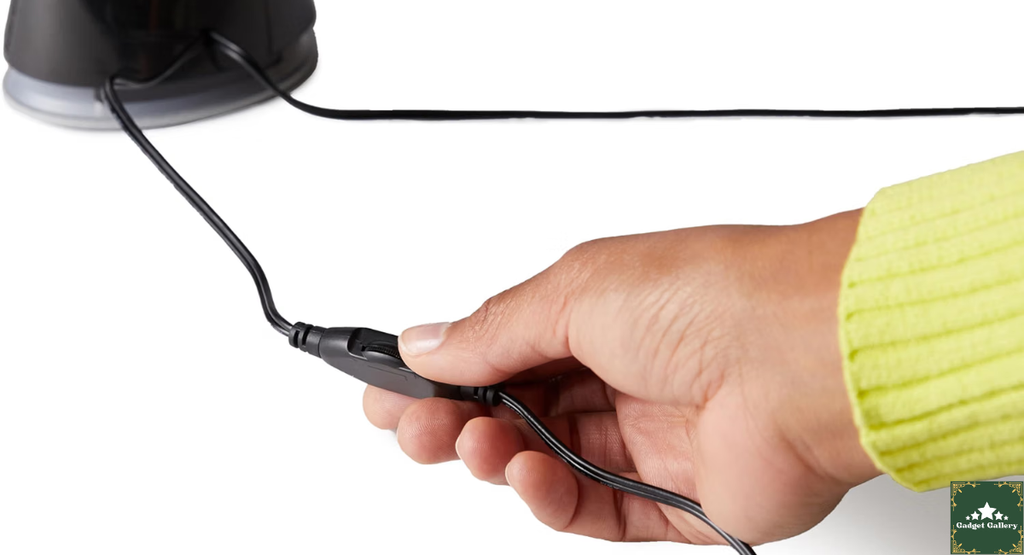
The USB-A power connection means no separate power adapter and no additional outlet required.
The advantage: Clean cable management. Two cables from the speakers—USB and 3.5 mm—both going to the computer. No wall adapter. No power strip space used. The desk stays cleaner than with a separately powered speaker set.
The limitation: The USB power provides a fixed power ceiling that limits how loud and powerful these speakers can be. They’re not going to fill a large room at high volume. For desk-range listening (2-3 feet from the speakers), they reach comfortable loud volume without distortion. At maximum volume in a moderately quiet room, they cover a typical office or bedroom adequately. For a larger room, louder volumes, or filling a space with music for other people, the USB power limitation becomes apparent.
I’ve never had a situation where USB-powered volume was insufficient for my own desk listening. I would choose a differently powered speaker if I needed to play audio for a group of people.
How These Compare to Laptop Built-In Speakers
This is the comparison that matters most for the majority of buyers.
I did a direct A/B comparison during the first week—same audio source, same volume level setting, switching between the Amazon Basics speakers and my laptop’s built-in speakers.
Laptop built-in speakers:
- Sound compressed and forward
- Bass frequencies are minimal
- Volume ceiling is low
- Stereo separation is minimal (speakers are close together)
- Audio fatigue sets in faster during long listening sessions
Amazon Basics speakers:
- Sound fuller and more open
- Bass is present (not deep, but present)
- Louder at maximum volume
- Genuine stereo separation across desk width
- More comfortable for extended listening
The difference is not subtle. It’s immediately audible, and the improvement holds across every content type I tested. For the price difference (essentially $17 to upgrade from free to these), the improvement per dollar spent is one of the better values in consumer audio.
The 3.5mm Connection: Compatibility Reality in 2026
The 3.5 mm aux input connects to any device with a standard headphone output—desktop computers, laptops, and older monitors with audio passthrough.
For modern USB-C-only laptops (MacBook Pro, MacBook Air, some PC ultrabooks): a 3.5mm to USB-C adapter is needed, or use the headphone jack if your laptop has one. Most current MacBook Airs have a 3.5mm headphone jack. Most PC laptops still include a headphone jack. Check your specific laptop before purchasing if you’re uncertain.
The Amazon Basics speakers are not Bluetooth and are not USB audio—they are specifically a 3.5mm wired connection paired with USB power. If your setup requires Bluetooth or USB audio, these speakers are not the right choice. For a standard desktop or laptop with a headphone jack, the 3.5mm connection is reliable and requires zero configuration.
Mistakes I Almost Made (And One I Did Make)
Almost Mistake 1: Buying something more complicated to solve a simple problem. I looked at 2.1 systems with subwoofers, Bluetooth desktop speakers, and USB audio devices before landing on these. For my actual use case—better-than-laptop speakers for a home office desk—all of that was solving problems I didn’t have. The simplest solution for a simple problem is usually the right one.
Mistake I Actually Made: Positioning both speakers on the same side of my monitor initially. For the first week I had my speakers stacked to the right of my monitor because of cable length concerns. Mono or highly imbalanced stereo from this configuration sounded worse than laptop speakers because the stereo imaging was wrong. Moving them to opposite sides of the monitor—which required running a cable behind the monitor—fixed this immediately. Stereo speakers need to be positioned in stereo. Obvious in retrospect, less obvious when you’re just trying to get them connected quickly.
Almost Mistake 2: Expecting bass performance from satellite-only speakers. Going in with realistic expectations about bass saved me from disappointment. If you know the Amazon Basics 2.0 speakers will produce adequate but not impressive bass, you won’t be surprised when hip-hop feels thin. If you expect bass response similar to speakers with a subwoofer, you will be disappointed. Know what you’re buying.
Who Should Buy the Amazon Basics PC Speakers
Buy these if you:
Are upgrading from laptop built-in speakers for home office use—this is the primary use case, and the value proposition is clear. The audio improvement is immediate and meaningful.
Want a dead-simple setup with no drivers, no Bluetooth, and no configuration? Plug in and audio plays.
Need clean cable management without a separate power adapter. USB power from the computer keeps the cable situation minimal.
Use your computer primarily for voice content—calls, podcasts, videos, tutorials, and streaming shows. This is where the speakers perform best relative to their price.
Are you a student setting up a first desk or someone furnishing a home office on a budget?
Want background music quality during work sessions without prioritizing audiophile listening.
Consider alternatives if you:
Listen to bass-heavy music as your primary use case—a 2.1 system with a subwoofer would serve you significantly better.
Need to fill a large room with sound or play audio for a group—USB-powered satellite speakers reach adequate desk volume but not room-filling volume for larger spaces.
Want Bluetooth connectivity to connect phones or tablets without cables—these are wired 3.5 mm only.
Use a USB-C-only laptop without a headphone jack—you’d need an adapter, which adds cost and complexity.
Care deeply about music quality as an end in itself—at this price point you’re in the “adequate and convenient” tier, not the “genuinely good audio” tier.
Pros and Cons
Pros
Immediate, dramatic improvement over laptop built-in speakers—the most relevant comparison for most buyers
USB-powered with no separate adapter—clean desk setup with minimal cables and no power strip space required
3.5mm connection works on any device with a headphone jack—no compatibility concerns for standard desktop and laptop setups.
The physical volume knob provides hardware-level control faster than software alternatives.
True stereo separation across desk width—genuine stereo imaging that laptop speakers cannot produce
Genuinely plug-and-play—no drivers, no software, no configuration; works in under 2 minutes
Compact footprint—fits comfortably on any desk without taking significant space
Amazon brand warranty and customer service—consistent return policy if any defect occurs
Excellent price-to-upgrade ratio—meaningful audio improvement for a very small investment
Cons
Limited bass—satellite-only configuration without subwoofer produces thin low-frequency response for bass-heavy content.
USB power ceiling limits maximum volume—adequate for desk listening, insufficient for filling larger spaces.
Not Bluetooth—wired connection only; cannot connect wirelessly from phones or tablets
May require a 3.5 mm adapter for USB-C-only laptops—adds cost if your device lacks a headphone jack
Speaker driver size limits the audio quality ceiling—the small drivers produce good sound for the price but physically cannot match larger speaker systems.
Fixed connecting cable between speakers—the cable length between left and right is fixed; desk width must accommodate the cable span
FAQs
Q: Do these speakers require any software or drivers to work? A: No. These are plug-and-play 3.5mm audio output speakers. Your computer recognizes them as a standard audio output device automatically. No driver download, no software installation, no configuration.
Q: Do they work with Mac? A: Yes. The 3.5mm connection works on macOS exactly as on Windows. The USB power works on any USB-A port. MacOS recognizes the output automatically without any settings change.
Q: How loud do they get? A: At maximum volume in a moderately quiet room, they comfortably fill a standard home office or bedroom without distortion. They are not suited for filling a living room or playing audio for a group of people in a larger space.
Q: Can I connect these to my phone? A: Yes, if your phone has a 3.5mm headphone jack. You would need to power the speakers via USB (a USB wall adapter or power bank works) and connect the 3.5mm to your phone’s headphone output. For phones without a 3.5mm jack, a Lightning or USB-C to 3.5mm adapter enables connection.
Q: What is the cable length between the two speakers? A: The cable connecting left and right speakers is approximately 3 feet, which comfortably spans a standard desktop monitor width. Check the current product listing for exact cable length measurements.
Q: Do these have a power button? A: The volume knob functions as an on/off control—turning it to minimum effectively mutes output; turning it off fully powers down the speakers in some versions. In practice, most users leave them connected and manage audio via the volume knob and computer volume controls.
Q: Are these suitable for music production or audio mixing? A: No. These are consumer-grade satellite speakers with limited frequency response accuracy. For audio production requiring flat, accurate monitoring, dedicated studio monitor speakers with flat response are the appropriate tool.
Final Thoughts
Eight months ago I spent $17 to stop making excuses about my laptop speakers, and the thing I remember most about that purchase is how quickly I stopped noticing I had made it.
That’s the compliment these speakers deserve: they solved the problem and then disappeared into my setup without requiring any further attention. No connection issues. No settings to manage. No audio problems that made me remember they existed. Just audio that sounds the way audio is supposed to sound on a desk setup.
The bass limitation is real. The volume ceiling is real. For casual desk work, video calls, streaming content, and background music—which describe the majority of home office and study desk use cases—neither limitation matters enough to look elsewhere.
If you’re still listening through laptop speakers because you haven’t gotten around to fixing it, this is the thing to buy. The improvement is immediate, the price is low enough that the risk is minimal, and the setup is simple enough that you’ll be using them within three minutes of opening the box.
Where to Buy
🛒 Check Current Amazon Basics PC Speakers Price on Amazon →
Related Reviews Worth Reading
- JBL Clip 5 Portable Speaker Review—Step up in audio quality for desk or portable use
- Amazon Echo Dot Newest Model Review—Smart speaker alternative with Alexa for desk setups
- EMEET C960 1080P Webcam Review—Upgrade your desk video alongside your audio
- Dell 27 Plus Monitor S2725HSM Review—Complete your desk setup with a monitor upgrade
- Logitech Ergo K860 Keyboard Review—Full ergonomic desk setup companion
👉 Subscribe to @5stargadgetgallery on YouTube—weekly budget tech reviews and honest desk setup guides. Subscribe and hit the notification bell!
🌐 Start Your Own Budget Tech Review Blog
This site runs on Hostinger—the hosting platform I use—because it’s genuinely beginner-friendly and affordable for a review blog that’s growing.
- Plans start at $2.99/month
- Free domain for year one
- One-click WordPress installation
- Fast servers for content-heavy review pages
- 24/7 live chat support
Start your tech review blog with Hostinger.
Disclosure: This article contains Amazon Associates affiliate links. As an Amazon Associate, I earn from qualifying purchases at no additional cost to you. The Amazon Basics Stereo 2.0 PC Speakers were personally purchased and used for eight months of daily home office and content creation work before writing this review. All findings are entirely my own.