I was standing in the Apple Store with a pair of AirPods Pro 2 in my hand, credit card already out, when my friend who works in IT asked me a question that stopped me cold.
“Do you actually need wireless? Or do you just think you need wireless?”
I put the AirPods back. Went home. Plugged the USB-C EarPods that came with my MacBook into my iPhone 16. Used them for a week. Then I bought a second pair to keep at my desk.
That was four months ago. This is the full story of what I found—including the parts that will surprise people who have already written off wired earbuds as obsolete.
What Made Me Actually Pay Attention to These
Let me back up and explain how I spent two years dismissing these before actually using them.
When Apple moved from Lightning to USB-C on the iPhone 15 series, they released USB-C EarPods alongside it. I noticed them. Filed them under “for people who don’t have AirPods.” Moved on.
Then last spring I had a specific problem. I was on a four-hour flight, halfway through a long Zoom interview I was recording on my laptop, and my AirPods died. Not low—dead. Wouldn’t turn on. The case was dead too. I had used them on the way to the airport and forgotten to charge.
The person I was interviewing is based in Auckland. Rescheduling would have meant two weeks’ delay. I scrambled, found the EarPods in my bag that I hadn’t thrown away for some reason, plugged them into my MacBook’s USB-C port, and finished the interview.
Audio quality on the call: fine. No complaints from either end. The microphone worked. No cutting out, no reconnecting, no battery management.
That four-hour flight finished without a single audio problem. When was the last time I said that about wireless earbuds?
Design and Fit: What the Actual Experience Is Like
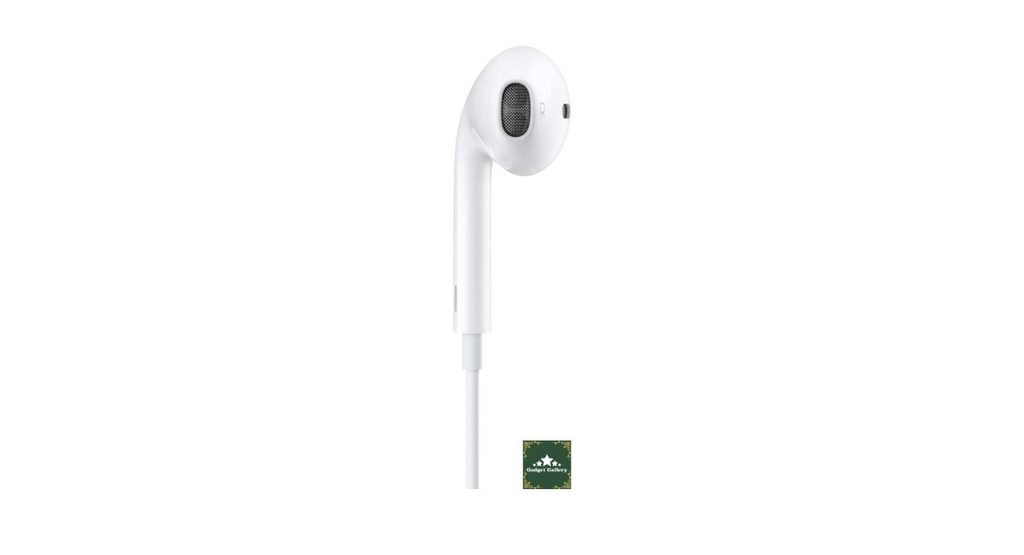
Apple’s EarPods have a specific design philosophy that divides people sharply—you either fit the shape or you don’t.
The EarPod design sits in the outer ear rather than sealing inside the ear canal like most modern earbuds. There’s no silicone tip to swap, no foam ear wing, and no ear hook. They just… sit there, held in place by the natural curve of the outer ear.
For me personally, they stay in well enough for sitting, walking, and light movement. They have never fallen out while I’m working at a desk or commuting. For running or high-intensity exercise, they shift and need occasional adjustment—this isn’t a sport earbud and doesn’t try to be.
The design means zero insertion pressure and zero ear canal fatigue. People who find in-canal earbuds uncomfortable after an hour will find EarPods dramatically more pleasant for extended wear. I can wear these for three or four hours of continuous listening without the subtle ache I get from silicone-tipped earbuds.
The tradeoff is passive noise isolation. Because they don’t seal the ear canal, ambient sound comes through clearly. On a noisy plane or crowded subway, you’ll hear your environment as well as your audio—not ideal for blocking out the world.
Sound Quality: The Honest Number
I’ve seen reviews describe Apple EarPods as having “surprisingly good audio for the price”—which is accurate but vague. Let me give you something more specific.
For voice content—podcasts, audiobooks, calls, and YouTube videos—these sound genuinely good. Clear, natural, and positioned correctly in the center of your head. Dialogue in movies and interviews is easy to follow.
For music, the character is warm and midrange-forward. Vocals sit prominently. Acoustic guitar, piano, and anything with natural instrument character sounds pleasant and clear.
Bass is present but not deep. Hip-hop, EDM, and bass-forward genres will feel thin compared to earbuds with silicone tips that create a seal. The open design means bass literally escapes out of the ear—physics, not a design flaw, but worth understanding.
Treble is smooth without sibilance. Extended listening sessions don’t cause the ear fatigue that bright, harsh high frequencies create on cheaper earbuds. This surprised me—I expected a budget-tier treble. Instead, it’s restrained in a way that makes long listening comfortable.
I did a direct comparison with the Sony MDR-ZX110 wired headphones I reviewed previously. The EarPods have a slightly warmer, more intimate sound at lower volumes. The ZX110 wins at higher volumes where the larger 30mm drivers push more air. For close-range listening and calls, the EarPods are the better tool.
The USB-C Remote: The Feature Nobody Talks About Enough
The inline remote on the USB-C EarPods has three buttons and a microphone. Most reviews mention this briefly and move on. I want to spend more time here because this is what makes these earbuds genuinely useful rather than just adequate.
The three-button remote does:
Volume up and volume down—the outer two buttons. Works during music playback, calls, and videos. Immediate response every time.
Center button (the important one):
- Single press: Play/Pause (also answers calls)
- Double press: Skip to next track
- Triple press: Go back to the previous track
- Press and hold: Activates Siri
That’s a complete music and call control interface without touching your phone. For anyone who keeps their phone in a bag, pocket, or across the room—this is the daily difference.
I tested this specifically during a week of commuting where I kept my phone in my jacket’s inner pocket. Getting on and off trains, adjusting volume, skipping tracks, answering one call—I never touched my phone. The remote handled everything cleanly.
One honest limitation: the three-button layout requires a small learning curve. The center button is easy to identify by feel, but the volume buttons require slight finger movement to distinguish. After about three days I wasn’t thinking about it at all, but the first few days involve occasional accidental presses.
Call Quality: Where These Stand Out Most
Four months of regular call use has given me a clear picture of the EarPods microphone, and I’ll say this directly: it’s better than most people expect from earbuds at this price.
I use them for:
- Regular voice calls (multiple daily)
- Zoom meetings (3-4 per week)
- WhatsApp voice messages and calls
Feedback from people on the other end has been consistently positive. Two Zoom participants asked me what microphone I was using—when I said “Apple EarPods,” both expressed surprise. The microphone has good directional pickup of my voice and handles moderate ambient noise reasonably well.
The wired connection eliminates the audio compression that Bluetooth introduces on calls. If you’ve noticed that calls through wireless earbuds sometimes sound slightly processed or thin, wired audio doesn’t have this problem—the signal is clean and direct.
In quieter environments, the call quality is excellent—noticeably better than calling through a phone speaker. In loud environments (street noise, coffee shops), the microphone picks up ambient sound along with your voice. The pickup pattern is omnidirectional rather than directional, which is its main limitation for calls in noisy places.
USB-C vs Lightning: Which One Do You Need?
This is the most common question from buyers considering these, so let me answer it clearly.
Get USB-C EarPods if you have:
- iPhone 15, 15 Plus, 15 Pro, 15 Pro Max, or newer
- iPhone 16, 16 Plus, 16 Pro, 16 Pro Max, or newer
- iPhone 17 series (any model)
- Any modern MacBook, MacBook Air, MacBook Pro
- iPad Pro, iPad Air, iPad mini (recent generations)
- Any USB-C Android device
Get Lightning EarPods if you have:
- iPhone 14 or older (any model)
- Older iPad models still using Lightning
The USB-C version works directly on any USB-C device without adapters. This is the version you want if you’re on a current iPhone or MacBook. It also works on Android USB-C devices—I’ve used mine with a Samsung Galaxy tablet without any issues, though the remote button functions are limited to play/pause on Android (volume buttons control volume via hardware, and track skipping varies by device).
One important thing to know: the USB-C EarPods do NOT work on the MacBook’s headphone jack—only on the USB-C port. Keep this in mind for desktop setups where your USB-C ports are occupied.

Compatibility Across My Devices — What Actually Worked
Four months of real use across multiple devices:
iPhone 16 Pro: Plug in, works instantly. All three remote buttons function fully. Siri activates on long press. No configuration.
MacBook Pro M3: Plug into USB-C, and the system recognizes immediately as audio output AND microphone input. Zoom, FaceTime, and voice recording in Logic all used the EarPods microphone correctly.
iPad Pro (USB-C): Same immediate recognition as MacBook. Works during video calls in FaceTime and Teams.
Samsung Galaxy S25 (Android): Plugs in, audio works immediately. Volume buttons worked for system volume. Track skip from triple-press didn’t work in Spotify—this is an Android compatibility limitation, not a defect.
Nintendo Switch (USB-C): Audio output works in handheld mode. Remote buttons had no function—the Switch doesn’t support inline remotes. Fine as simple earbuds.
Mistakes I Made — Honest Lessons
Mistake 1: Thinking these were a permanent second choice. I bought my second pair, planning to use them only when my wireless earbuds were charging. I ended up reaching for EarPods more often than I expected because plugging in takes zero mental overhead. No mode-switching in my brain—just audio.
Mistake 2: Storing them loose in my bag. The first month, I just dropped them in my bag. The cable developed tangles around other objects constantly. I now keep them in the small pouch from an old earbuds case. Takes 5 seconds to loop and store. No tangles.
Mistake 3: Yanking the cable by the wire instead of the plug. I’m careful about this now. The USB-C connector is the most vulnerable point—pulling by the wire rather than the plug stresses the connection over time. Pull by the plug housing. This applies to any wired earbuds.
Mistake 4: Using them on a plane without understanding the noise isolation situation. For the first flight, I used them, expecting some isolation. The open design means airplane engine noise comes through at a level that makes quiet podcasts hard to follow. You need higher volume than usual on flights, which isn’t ideal. For plane use, noise-isolating earbuds or headphones are the better choice.
Who Should Buy Apple EarPods USB-C?
These are genuinely the right choice for:
Current iPhone owners who don’t want to spend $150-250 on AirPods. These are Apple-quality audio for $19. The brand compatibility and remote functionality make them the most seamless wired earbud option for iPhone users.
Anyone who is constantly forgetting to charge wireless earbuds. If you’ve had the experience of reaching for wireless earbuds and finding them dead more than once a month, wired earbuds eliminate that problem permanently. Plug in, and audio plays.
Remote workers who take a lot of calls and want clear audio without managing Bluetooth. The wired connection and good microphone make every call cleaner than using a phone speaker.
Students who want reliable earbuds for lectures, study sessions, and the occasional call. The price makes losing or damaging them less painful.
MacBook users who want earbuds that work seamlessly with both their Mac and their iPhone without a separate pair for each.
Skip these if:
You go to the gym or run regularly. The open fit doesn’t stay secure during vigorous movement, and there’s no sweat resistance rating.
You need to block out noise consistently. Open design means you hear your environment. Not suitable as a noise isolation tool.
You rely on a 3.5mm headphone jack. USB-C only—won’t work in traditional headphone jacks without an adapter.
You primarily listen to bass-heavy music. Hip-hop, EDM, and bass-forward genres don’t get the treatment they deserve without a sealed earpiece. In-canal earbuds with silicone tips handle bass better.
Pros and Cons
Pros
No battery, no charging, no pairing—plug in and audio works every single time without preparation.
Excellent call quality—the microphone is better than expected, and wired audio provides a cleaner call signal than Bluetooth compression.
Full inline remote with play/pause, skip, volume, and Siri activation—complete phone control without touching your phone
Universal Apple device compatibility—works natively on iPhone 15 and newer, all recent iPads, and all USB-C MacBooks
Comfortable for long sessions—open design means zero ear canal pressure during extended wear.
Apple ecosystem integration—Siri, remote functions, and audio handoff work exactly as expected on Apple devices.
Affordable—$19 for genuine Apple audio quality and remote functionality
Works on Android USB-C devices—audio and basic playback controls function on non-Apple USB-C hardware.
Cons
No noise isolation—open design lets ambient sound in clearly; not suitable for blocking out the environment
Bass is limited—open fit means bass escapes; not the right choice for bass-forward music genres.
Cable management required—like any wired earbuds, tangles develop without mindful storage habits.
Remote learning curve—three-button layout requires a brief adaptation period to operate confidently.
USB-C only—no 3.5mm headphone jack compatibility without an adapter
Fit isn’t universal—the fixed EarPod shape works well for some ear shapes and less well for others; no ear tips to swap.
Limited Android remote functionality—track skip and Siri don’t work on Android; some remote functions are limited to Apple devices.
FAQs
Q: Do Apple EarPods USB-C work with Android phones? A: Yes, for audio playback and basic call function. The center button plays/pauses and answers calls on Android. Volume buttons typically control system volume. Track skipping via triple-press and Siri activation doesn’t work on Android—those are Apple ecosystem functions. For audio and calls, they work well.
Q: Can I use these with an older iPhone that has a Lightning port? A: No—USB-C and Lightning are different connectors. You need the Lightning version of EarPods for older iPhones (iPhone 14 and earlier). The USB-C version won’t physically connect to a Lightning port without an adapter.
Q: Do these work with the MacBook’s 3.5mm headphone jack? A: No. These are USB-C only. They work in the USB-C ports on any MacBook but not in the 3.5mm headphone jack. If you need to use them on a traditional headphone jack, you’d need a USB-C to 3.5mm adapter.
Q: How does the microphone compare to AirPods for calls? A: In quiet environments, the difference is minimal—both produce clear, natural voices for calls. AirPods have better active noise isolation for the microphone in loud environments. In a quiet home office or car, the EarPods microphone is entirely comparable for call quality.
Q: Are these suitable for exercise? A: Not ideally. The open design doesn’t create a secure seal for high-movement activities, and there’s no sweat or water resistance rating. They work fine for light activity and walking, but dedicated sport earbuds with ear hooks and sweat resistance are better for gym use.
Q: What’s the difference between USB-C EarPods and Lightning EarPods besides the connector? A: The audio hardware and microphone are essentially the same. The only meaningful difference is the connector type. Get USB-C for iPhone 15 and newer; get Lightning for iPhone 14 and older.
Q: Do these come in the box with new iPhones? A: Apple no longer includes EarPods in iPhone retail boxes—they removed them to reduce packaging. You can find them in the box with some Mac products or purchase them separately. The standalone purchase price is typically $19.
Q: Can I use these for recording podcasts or voiceovers? A: For casual podcast recording on a phone or tablet as a convenient clip-on mic, yes—the microphone quality is adequate. For professional-quality voiceover or podcast recording where audio accuracy matters, a dedicated USB microphone delivers significantly better results.
Final Thoughts
Four months later, I still reach for these more than I expected to.
The AirPods Pro are still on my desk. I use them. But I don’t use them as automatically as I expected to after spending $250 on them. The EarPods get plugged in when I sit down to work, during calls, and when I want audio without the mental overhead of charging and connecting.
The honest summary: Apple EarPods USB-C are not the best-sounding earbuds I own. They’re not the most advanced. They have real limitations—no noise isolation, thin bass, and a cable to manage.
But they are the most consistently reliable pair of earbuds I own. Every single time I plug them in, audio works. Every call sounds clear. Every button press does what I expect.
At $19, that reliability has value that doesn’t show up in any spec sheet.
Where to Buy
🛒 Check Current Apple EarPods USB-C Price on Amazon →
Related Reviews Worth Reading
- Sony MDR-ZX110 Wired Headphones Review—On-ear wired alternative with better bass
- Soundcore P30i by Anker Earbuds Review—Step up to ANC for $60-70
- USB C Lavalier Microphone Review—Better USB-C mic for content creators
- JBL Clip 5 Portable Speaker Review — When you want audio without anything in your ears
- Apple iPhone 14 Renewed Review—Budget iPhone to Pair with These EarPods
📺 Watch Our Apple EarPods USB-C vs AirPods Call Quality Comparison
See a direct call quality test, remote button demo, and real-world commute use on our YouTube channel:
👉 Subscribe to @5stargadgetgallery on YouTube—New honest audio reviews every week. Hit the notification bell!
🌐 Start Your Own Tech Review Blog
This site runs on Hostinger—beginner-friendly hosting that makes launching a review blog straightforward even without technical experience.
- Plans start at $2.99/month
- Free domain for the first year
- One-click WordPress setup
- 24/7 live chat support
Launch your review blog with Hostinger today. →
Disclosure: This article contains Amazon Associates affiliate links. As an Amazon Associate, I earn from qualifying purchases at no additional cost to you. The Apple EarPods USB-C were personally purchased and used daily for four months. All opinions and observations are entirely my own.