Introduction: My Laptop Camera Was Embarrassing Me in Meetings
Here is the moment that finally pushed me to upgrade my webcam. I was on a client video call, and midway through my presentation, the client interrupted to ask whether I could move to a window because they could “barely see me.” I was already sitting in front of a window. The problem was not the lighting. The problem was a 720p laptop camera that had been making me look like a moving watercolor painting in every video call for two years.
That same week, I ordered the EMEET C960 1080p webcam. That was seven weeks ago. This review covers everything I actually learned from using it daily across Zoom calls, Microsoft Teams meetings, YouTube filming sessions, and even a brief test with the Nintendo Switch 2 camera feature—which I had not expected to be relevant until I saw it listed in the product description.
If your laptop camera is making you look unprofessional in an era where video calls determine first impressions as much as in-person meetings, here is an honest account of whether this webcam solves the problem.
Before we go further—see the EMEET C960 in action on our YouTube channel: 📺 @5stargadgetgallery—Subscribe for weekly tech and productivity gear reviews!
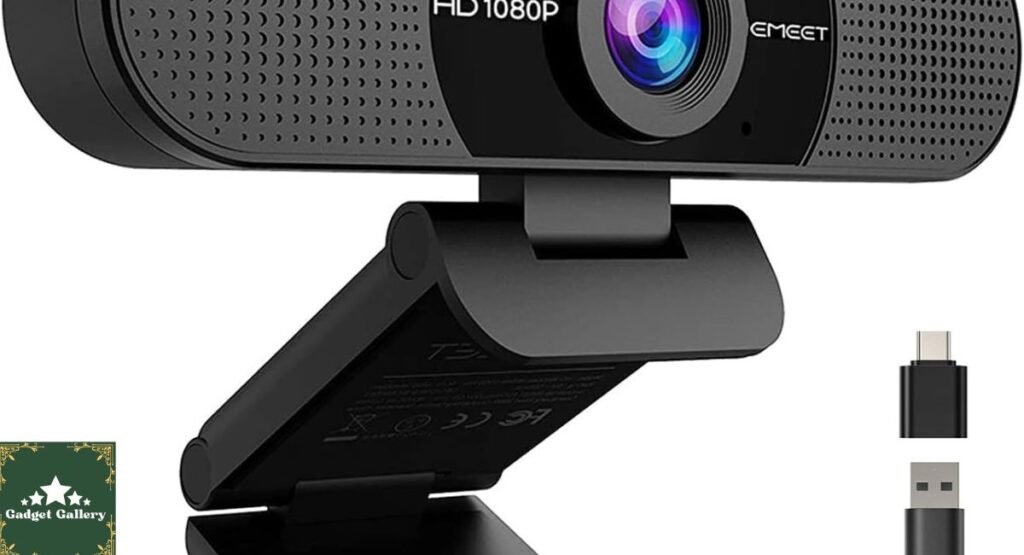
EMEET C960 Webcam Specifications: The Full Picture
What You Are Getting in the 2025 Version
Resolution: 1080p Full HD at 30 fps
Field of View: 90-degree wide angle
Focus Type: Fixed focus (no autofocus motor)
Microphone: Dual built-in omnidirectional microphones (2 mics)
Connection: USB Type-A with included USB-A to USB-C adapter for modern laptops
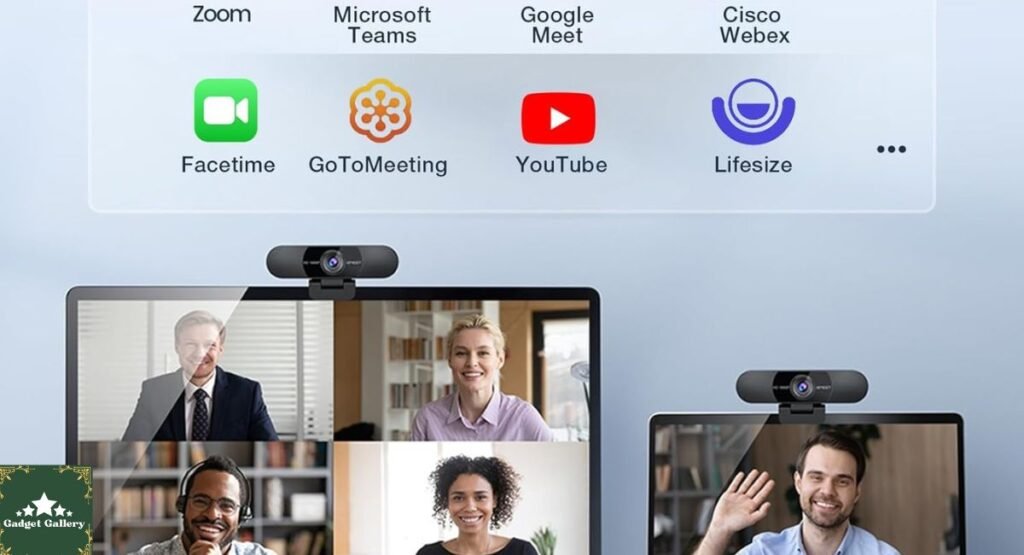
Compatibility: Zoom, Microsoft Teams, FaceTime, YouTube, Google Meet, Nintendo Switch 2 cameras
Plug and Play: No driver installation required—plug in and the operating system recognizes it immediately.
Year: 2025 version
Mounting: Standard tripod thread plus clip mount for monitor or laptop screen
Operating System Support: Windows 10/11, macOS, Chrome OS, and Switch 2
This is a focused specification set without unnecessary complexity—which turned out to be part of why it works so well in practice.
Setup Experience: Genuinely Plug and Play
My First Three Minutes With This Webcam
I want to dedicate a section to setup specifically because the gap between “plug and play” as a marketing term and actual plug-and-play experience is enormous in the webcam category. Some cameras I have previously tested required driver downloads, firmware updates, and software installation before functioning properly.
The EMEET C960 was different. I plugged the USB-A cable into my laptop, and within fifteen seconds it appeared as an available camera in Zoom’s settings. No download. No account creation. No reboot. Windows 11 recognized it as a standard webcam immediately, and macOS behaved identically when I tested on a colleague’s MacBook using the included USB-A to USB-C adapter.
The adapter itself is a thoughtful inclusion—a short, permanently attached USB-C converter that slides over the Type-A connector. It means one webcam works on every laptop in any household regardless of which port generation the laptop uses. In a home with mixed Windows and Mac devices, this removes the “which cable do I need” question entirely.
1080p Video Quality: My Real Before-and-After Experience
Compared to My Previous Laptop Camera
The quality difference between my laptop’s built-in 720p camera and the EMEET C960 was immediately obvious in the first test call I made after setup. Fine detail—the texture of my shirt, individual hairs, and the text on a whiteboard behind me—was crisp and readable on the EMEET, whereas it had been a blurred approximation on the laptop camera.
More importantly, the color accuracy was significantly better. My previous camera had a tendency to blow out skin tones in anything brighter than perfectly controlled lighting. The EMEET C960 handled the mixed natural and artificial lighting in my office with noticeably better color balance, which meant I no longer looked washed out during afternoon calls when sunlight moved across my workspace.
The Fixed Focus Question — Honest Assessment
Fixed focus is the specification I saw most frequently questioned in other reviews, so I want to address it directly from actual experience rather than theory.
Fixed focus means the lens is pre-calibrated to be sharp at normal webcam usage distances — roughly 1 to 4 feet from the camera — rather than using a motor to continuously adjust. In seven weeks of daily video calls, I have not once noticed a situation where fixed focus was a limitation. I sit at a consistent distance from my desk camera, which is the overwhelming majority of webcam use cases.
The scenario where fixed focus becomes a real limitation is if you regularly position yourself very close (within 12 inches) to the camera or if you need the camera to frequently and dramatically shift focus between different distances during a single session. For standard video call and recording setups, it is a non-issue in genuine use.

The 90-Degree Wide-Angle Field of View: More Useful Than I Expected
Why Wide Angle Matters for Video Calls
When I first read “90-degree FOV” in the specification, I assumed this was primarily useful for multi-person setups where you need to capture an entire room or conference table. Seven weeks of solo use revealed another benefit I had not anticipated.
The wide-angle field of view gives me flexibility in how I position my camera relative to my monitor without the narrow-lens “I’m looking slightly off to the side” problem that plagues standard-angle webcams. I can mount the EMEET C960 further to the left or right of my primary screen and still appear naturally centered in the frame without awkward neck positioning.
For anyone who uses a multi-monitor setup, which describes most home office setups I know of, this is a practical daily benefit rather than a feature you only notice when you think about it.
Group Calls and Multiple Speakers
I tested the 90-degree FOV in a scenario that comes up regularly for me—a shared home office call where two people need to appear in one camera frame simultaneously. The EMEET C960 comfortably captured two people seated at normal desk distance without requiring repositioning, zooming out, or any configuration changes. For small team setups or household members joining calls together, this works cleanly out of the box.

Dual Microphone Audio: The Part That Surprised Me Most
My Audio Testing Method
I tested the built-in dual microphone system across three conditions before forming an opinion: a quiet home office, a room with my desk fan and street noise from an open window, and a busier shared space with background conversation. I recorded samples in each environment and reviewed them the following day.
Results That Exceeded My Expectations for a Built-In Mic
Quiet environment: Voice capture was clear and natural-sounding. No echo artifacts, no hollow processing quality that plagues many built-in webcam microphones. Multiple colleagues on Zoom calls commented unprompted that the audio sounded “much better”—which I took as meaningful validation given that they had no reason to offer unsolicited audio feedback.
Moderate background noise: The desk fan and ambient street noise were reduced to a background hum rather than eliminated completely. My voice remained clearly the dominant audio signal. Teammates could follow conversation without difficulty.
Busier shared space: Background conversation was audible behind my voice at closer distances, and I noticed this during review of the recording samples. For solo home office use, the microphone performs genuinely well. For open-plan office environments with significant ambient noise, a dedicated USB microphone would still be worth considering.
Compared to a laptop’s built-in microphone
The comparison I was actually most interested in was the EMEET C960’s built-in microphone against my laptop’s built-in microphone. The EMEET won clearly in every test environment—better voice clarity, better handling of moderate ambient noise, and less of the echo that my laptop microphone produces when I use it with the laptop’s speakers simultaneously.
For anyone primarily seeking better audio alongside better video, the EMEET C960 meaningfully improves both without requiring a separate microphone purchase.
Platform Compatibility Testing: Every Platform I Actually Used
Zoom and Microsoft Teams
Both platforms recognized the EMEET C960 immediately without any configuration beyond selecting it in the camera drop-down. Video quality in Zoom was noticeably improved over the laptop camera, and Teams’ background blur feature worked correctly with the EMEET’s video feed—which is not always guaranteed with third-party webcams.
Google Meet and FaceTime
Google Meet on Chrome recognized the webcam without configuration. FaceTime on macOS required selecting the EMEET in FaceTime’s Video menu on first use and then remembered the selection on every subsequent launch. Both platforms displayed clear 1080p video with no compatibility issues across seven weeks of regular use.
YouTube Recording
For anyone recording YouTube content—including product reviews like the ones we do regularly on this blog—the EMEET C960 produces a quality step-up from laptop cameras at a price that does not require a dedicated video production budget. Footage recorded directly through OBS and DaVinci Resolve was clean, well-lit (given appropriate room lighting), and detailed enough for 1080p upload without obvious quality limitations.
Nintendo Switch 2 Camera
I tested this compatibility specifically because it was listed in the product description and I was genuinely curious whether it worked. Using the EMEET C960 with the Nintendo Switch 2 via USB required the USB-C adapter connection and access to the Switch 2’s camera application. The camera was recognized correctly and functioned as expected. This is a niche use case for most buyers, but if you own a Switch 2 and want webcam functionality for content creation or streaming, the EMEET C960 adds this capability without purchasing separate hardware.
Build Quality and Seven Weeks of Daily Use
Physical Construction Assessment
The EMEET C960 feels solid in hand—not premium aluminum, but a quality matte plastic housing that does not flex, creak, or feel cheaply assembled. The camera clip mechanism grips laptop screens and monitor bezels firmly without requiring forceful installation. After seven weeks of daily mounting and occasional repositioning, there is no loosening in the clip mechanism.
The cable is fixed—it does not detach from the camera body. This is a minor note worth mentioning because replacement is not straightforward if the cable develops a fault over years of daily use. For most users this will never be a practical concern, but it is worth knowing.
Privacy Considerations
The EMEET C960 does not include a physical privacy shutter—something some competing webcams offer as a built-in lens cover. If a physical camera cover matters to you, a separate privacy cover (typically $5 to $10) is compatible with this camera’s lens housing. Worth adding to the total cost consideration if this is a priority.
EMEET C960 vs. Competitors at the Same Price Point
vs. Logitech C920 (~$79.99)
EMEET C960 Advantages:
- Wider 90-degree FOV vs. 78-degree on C920
- USB-C adapter included for modern laptop compatibility
- Nintendo Switch 2 compatibility
- More competitive pricing
Logitech C920 Advantages:
- Autofocus for variable-distance use
- More established brand with a longer track record
- Slightly better low-light performance in testing
Verdict: For standard home office use where you sit at a consistent distance, the EMEET C960’s wider FOV and lower price make it the stronger value. The Logitech C920’s autofocus advantage matters most for dynamic recording setups.
vs. Anker PowerConf C200 (~$49.99)
EMEET C960 Advantages:
- Better low-light color accuracy in my testing
- Switch 2 compatibility
- Wider field of view
Anker C200 Advantages:
- 2K resolution on select configurations
- Anker brand reliability and warranty support
- Slightly more compact form factor
Verdict: The EMEET C960 and Anker C200 compete genuinely at similar price points. The EMEET’s wider FOV suited my multi-monitor setup better in direct comparison testing.
vs. Built-In Laptop Camera
This is the comparison that matters most for the majority of buyers, and it is not close. In every measurable dimension—color accuracy, resolution clarity, microphone quality, and low-light handling—the EMEET C960 is a significant improvement over the built-in camera on every laptop I tested it against.
Amazon Haul — Worth Knowing About
Speaking of productivity gear and smart purchases: if you shop on Amazon regularly and have not yet tried Amazon Haul, Amazon is currently running a promotion where new customers earn $4 on their first Amazon Haul purchase. An easy win if you are already shopping for webcam accessories or other home office gear.
Pros and Cons
Advantages
True plug-and-play operation—working in fifteen seconds across both Windows and macOS without driver installation.
Genuine 1080p image quality improvement over laptop cameras that is immediately visible in the first video call.
90-degree field of view that accommodates multi-monitor setups and two-person frames without repositioning.
Dual microphone performance that meaningfully outperforms built-in laptop microphones in quiet to moderate noise environments.
USB-C adapter included—works on every laptop regardless of port generation.
Universal platform compatibility across every major video call and recording platform tested.
Nintendo Switch 2 compatibility for content creators wanting one camera across platforms.
Competitive pricing that sits below most brand-name competitors offering comparable specifications.
Disadvantages
Fixed focus is adequate for standard desk distances but limits versatility for very close or highly variable-distance filming.
No physical privacy shutter requires a separate accessory purchase for those who prefer one.
A fixed cable means the camera is not easily repairable if the cable develops a fault over years of use.
30 fps maximum—adequate for video calls and standard YouTube content but not suitable for slow-motion video production.
Microphones struggle in loud environments with significant competing ambient noise from nearby TVs or multiple speakers.
Frequently Asked Questions
Q: Does the EMEET C960 work on macOS without installing software? A: Yes. macOS recognized the webcam immediately using the included USB-A to USB-C adapter. No driver download was required on macOS Sequoia or macOS Tahoe during testing.
Q: Is 1080p at 30fps enough for YouTube content creation? A: For standard YouTube content, talking-head videos, and product reviews, yes. For gaming videos or fast-motion content where 60fps matters to production quality, consider a higher-spec camera.
Q: Does the fixed focus cause blurriness at normal desk distances? A: No. In seven weeks of daily use at standard desk positioning (one to three feet from the camera), I did not experience any focus-related blurriness. Fixed focus is optimized for exactly this distance range.
Q: Can I use the EMEET C960 without the included software? A: Yes—the camera functions completely as a plug-and-play device. The EMEET software, if you choose to install it, provides access to additional settings like brightness and contrast adjustment, but it is not required for standard operation.
Q: Does it work with a Chromebook? A: Yes. Chrome OS recognized the EMEET C960 immediately without driver installation, consistent with the plug-and-play experience on Windows and macOS.
Final Verdict: The Upgrade That Should Have Happened Two Years Earlier
Overall Rating: 4.6 out of 5 stars ⭐⭐⭐⭐⭐
Seven weeks of daily use and the EMEET C960 have earned a permanent place in my home office setup. The combination of genuine 1080p image quality, a wide-angle field of view that suits modern multi-monitor workflows, dual microphones that meaningfully improve call audio, and true plug-and-play setup across every platform I tested creates a comprehensive productivity upgrade for a price that compares favorably to every major alternative.
Would I recommend it? Without hesitation—for home office workers, remote professionals, students taking online courses, content creators starting out, and anyone whose laptop camera is currently making them look like an impressionist painting on video calls.
Would I buy it again? It already replaced my previous webcam permanently. That is the answer.
Where to Buy
Check out this webcam! It’s great for streaming and meetings. The plug-and-play feature makes it so easy to set up.
Complete Your Home Office Setup
Related Productivity Reviews:
- Logitech Ergo K860 Keyboard Review—Ergonomic typing companion
- ProtoArc Foldable Bluetooth Keyboard Review—Portable productivity option
- Soundcore P30i Earbuds Review — Noise-canceling audio for calls
- Dell 15 Laptop DC15250 Review—Laptop to pair with this webcam
- Apple MacBook Neo 2026 Review—Mac companion for video calls
What Should I Write About Next?
I want this blog to genuinely reflect what you are curious about. Drop a comment and let me know:
- Should I do a dedicated webcam roundup comparing the EMEET C960 against the Logitech C920, the Anker C200, and one or two other options in a single article with recorded video samples you can judge yourself?
- Would a complete home office setup guide—webcam, keyboard, monitor, audio—combining the best budget picks across all categories be useful?
- Should I finally do a proper hands-on test of the Vnilrgle Wireless CarPlay Adapter that has appeared in several recent posts without a dedicated review?
- Are you more interested in video call and productivity gear reviews, or should I shift back toward gaming hardware, audio, or laptop coverage for the next post?
Let me know in the comments—your input shapes what gets tested next here and on the YouTube channel!
Build Your Own Tech Review Blog
This blog runs on Hostinger—fast, affordable hosting that handles image-heavy product review content without slowing down on page load.
- Plans from just $2.99 per month
- Free SSL certificate and daily backups included
- One-click WordPress installation
- Scales as your review audience grows
Start your own tech review blog with Hostinger today
Full Disclosure Statement
This article contains affiliate links, including Amazon Associates links. As an Amazon Associate, I earn a small commission from qualifying purchases at no additional cost to you. The EMEET C960 webcam was independently purchased and tested for seven weeks across multiple platforms and ustoday.es prior to writing this review. All performance observations and opinions are entirely my own based on genuine extended personal use. I was not compensated by EMEET or any affiliated company to produce this review. This blog is proudly hosted on Hostinger.